Automated Installation of OpenSearch on Ubuntu Linux

Introduction
In this guide, we explore an automated installation and configuration of OpenSearch and OpenSearch Dashboards on Ubuntu Linux using a comprehensive Bash script. This script streamlines the deployment process for a standalone OpenSearch instance with its accompanying Dashboards interface, handling everything from system prerequisites to security configuration and service management.
Problem Statement
Setting up OpenSearch and OpenSearch Dashboards manually involves numerous steps that can be complex and error-prone. These include configuring Java environment, managing system settings like swap memory, installing the correct package versions, setting up security credentials, configuring services, and ensuring proper communication between components. Without automation, this process requires significant time and expertise, increasing the risk of misconfiguration or incomplete setup that could affect performance and security.
Solution
opensearch-setup.sh
#!/bin/bash

# ==============================================================================
# OpenSearch and OpenSearch Dashboards Installation Script for Ubuntu Linux
# ==============================================================================
#
# IMPORTANT:
# - Run the script with 'root' privileges (sudo ./script_name.sh).
# - Script may affect existing installations, clean system recommended.
# - Optimize JVM Heap (-Xms/-Xmx) settings according to your system.
# - Demo TLS certificates are used, use your own certificates for Production.
# - Check firewall settings (Port 9200, 5601).
# ==============================================================================


# ------------------------------------------------------------------------------
set -e
set -u
set -o pipefail

JAVA_MAJOR_VERSION="17"
OPENSEARCH_REPO_VERSION="2.x"
JVM_HEAP="1g"
INTERVAL=5

log_info() {
    echo "[INFO] $(date '+%Y-%m-%d %H:%M:%S') - $1"
}
log_warn() {
    echo "[WARN] $(date '+%Y-%m-%d %H:%M:%S') - $1"
}
log_error() {
    echo "[ERROR] $(date '+%Y-%m-%d %H:%M:%S') - $1" >&2
    exit 1
}
check_root() {
    if [[ "$EUID" -ne 0 ]]; then
        log_error "This script must be run with root privileges. Use 'sudo $0'."
    fi
}

check_root
log_info "Starting OpenSearch (Standalone, APT) and Dashboards (DEB Download) installation..."

log_info "Setting initial password for 'admin' user for OpenSearch installation."
NEW_ADMIN_PASSWORD=""
CONFIRM_PASSWORD=""
while true; do
    IFS= read -rs -p "Enter the 'admin' password for OpenSearch: " NEW_ADMIN_PASSWORD
    echo
    IFS= read -rs -p "Re-enter the new password: " CONFIRM_PASSWORD
    echo
    if [ "$NEW_ADMIN_PASSWORD" == "$CONFIRM_PASSWORD" ]; then
        if [ -z "$NEW_ADMIN_PASSWORD" ]; then
            log_warn "Password cannot be empty. Please try again."
        else
            if [[ ${#NEW_ADMIN_PASSWORD} -lt 12 ]]; then
                log_warn "Password must be at least 12 characters long. Please try again."
            elif [[ ! "$NEW_ADMIN_PASSWORD" =~ [a-z] ]]; then
                log_warn "Password must contain at least one lowercase letter. Please try again."
            elif [[ ! "$NEW_ADMIN_PASSWORD" =~ [A-Z] ]]; then
                log_warn "Password must contain at least one uppercase letter. Please try again."
            elif [[ ! "$NEW_ADMIN_PASSWORD" =~ [0-9] ]]; then
                log_warn "Password must contain at least one digit. Please try again."
            else
                log_info "Passwords match and meet policy requirements. Continuing installation."
                export NEW_ADMIN_PASSWORD
                break
            fi
        fi
    else
        log_warn "Passwords do not match. Please try again."
    fi
done

# ------------------------------------------------------------------------------
log_info "Step 1: Disabling SWAP..."
if free | awk '/^Swap:/ {exit $3==0}'; then
    log_info "SWAP is already disabled or not present."
else
    swapoff -a
    log_info "Active SWAP disabled."
    if grep -q 'swap' /etc/fstab; then
        sed -i.bak '/ swap / s/^\(.*\)$/#\1/g' /etc/fstab
        log_info "/etc/fstab updated (backup: /etc/fstab.bak)."
    else
        log_info "No active swap entries found in /etc/fstab."
    fi
    log_info "SWAP permanently disabled."
fi

# ------------------------------------------------------------------------------
log_info "Step 2: Updating system and installing required packages..."
apt-get update -y
apt-get install -y \
    wget \
    gnupg \
    apt-transport-https \
    ca-certificates \
    lsof \
    curl \
    software-properties-common \
    net-tools
log_info "Required packages installed."

# ------------------------------------------------------------------------------
log_info "Step 3: Installing OpenJDK ${JAVA_MAJOR_VERSION}..."
apt-get install -y "openjdk-${JAVA_MAJOR_VERSION}-jdk"

JAVA_HOME_PATH=$(update-java-alternatives -l | grep "java-1.${JAVA_MAJOR_VERSION}.0-openjdk" | awk '{print $3}') || \
JAVA_HOME_PATH=$(find /usr/lib/jvm -maxdepth 1 -type d -name "java-${JAVA_MAJOR_VERSION}-openjdk-*" | head -n 1)

if [ -z "$JAVA_HOME_PATH" ] || [ ! -d "$JAVA_HOME_PATH" ]; then
    log_error "OpenJDK ${JAVA_MAJOR_VERSION} installation path not found."
fi
log_info "Setting JAVA_HOME to: ${JAVA_HOME_PATH}"

JAVA_PROFILE_SCRIPT="/etc/profile.d/java_home.sh"
echo "export JAVA_HOME=${JAVA_HOME_PATH}" > "$JAVA_PROFILE_SCRIPT"
echo 'export PATH=$JAVA_HOME/bin:$PATH' >> "$JAVA_PROFILE_SCRIPT"
chmod +x "$JAVA_PROFILE_SCRIPT"

export JAVA_HOME=${JAVA_HOME_PATH}
export PATH=$JAVA_HOME/bin:$PATH

log_info "Java settings configured. Checking:"
java -version

# ------------------------------------------------------------------------------
log_info "Step 4: Adding OpenSearch APT repository..."
wget -qO - https://artifacts.opensearch.org/publickeys/opensearch.pgp | gpg --dearmor --batch --yes -o /usr/share/keyrings/opensearch-keyring.gpg
OPENSEARCH_REPO_FILE="/etc/apt/sources.list.d/opensearch-${OPENSEARCH_REPO_VERSION}.list"
echo "deb [signed-by=/usr/share/keyrings/opensearch-keyring.gpg] https://artifacts.opensearch.org/releases/bundle/opensearch/${OPENSEARCH_REPO_VERSION}/apt stable main" | tee "$OPENSEARCH_REPO_FILE" > /dev/null
chmod 644 /usr/share/keyrings/opensearch-keyring.gpg
chmod 644 "$OPENSEARCH_REPO_FILE"

log_info "Installing OpenSearch (via APT)..."
apt-get update -y

log_info "Providing initial admin password via OPENSEARCH_INITIAL_ADMIN_PASSWORD."
OPENSEARCH_INITIAL_ADMIN_PASSWORD="$NEW_ADMIN_PASSWORD" \
DEBIAN_FRONTEND=noninteractive \
apt-get install -y opensearch \
    -o Dpkg::Options::="--force-confdef" \
    -o Dpkg::Options::="--force-confold"

log_info "OpenSearch successfully installed."

# ------------------------------------------------------------------------------
log_info "Step 5: Configuring OpenSearch in standalone mode..."
OPENSEARCH_CONF_DIR="/etc/opensearch"
OPENSEARCH_YML="${OPENSEARCH_CONF_DIR}/opensearch.yml"
JVM_OPTIONS="${OPENSEARCH_CONF_DIR}/jvm.options"

if grep -q '^#cluster.name:' "$OPENSEARCH_YML"; then
    sed -i 's/^#cluster.name: .*/cluster.name: my-opensearch-standalone/' "$OPENSEARCH_YML"
fi

if grep -q '^#network.host:' "$OPENSEARCH_YML"; then
    sed -i 's/^#network.host: .*/network.host: 0.0.0.0/' "$OPENSEARCH_YML"
fi

log_info "Setting discovery.type: single-node."
sed -i '/^[# ]*discovery.type:/d' "$OPENSEARCH_YML"
echo "discovery.type: single-node" >> "$OPENSEARCH_YML"

log_info "Setting JVM Heap size (${JVM_HEAP})..."
log_warn "Attention: JVM Heap (${JVM_HEAP}) MUST be optimized for production!"
sed -i "s/^-Xms.*/-Xms${JVM_HEAP}/" "$JVM_OPTIONS"
sed -i "s/^-Xmx.*/-Xmx${JVM_HEAP}/" "$JVM_OPTIONS"

log_info "Standalone OpenSearch configuration completed."

# ------------------------------------------------------------------------------
log_info "Step 6: Enabling and starting OpenSearch service with systemd..."
systemctl daemon-reload
systemctl enable opensearch.service

log_info "Stopping current OpenSearch service (if running)..."
systemctl stop opensearch.service || true

log_info "Starting OpenSearch service..."
systemctl start opensearch.service

log_info "Waiting for OpenSearch to start (maximum 2 minutes)..."
MAX_WAIT=120
ELAPSED=0
while ! curl -k -u "admin:${NEW_ADMIN_PASSWORD}" --fail --silent https://localhost:9200 > /dev/null 2>&1; do
    sleep $INTERVAL
    ELAPSED=$((ELAPSED + INTERVAL))
    log_info "OpenSearch not ready yet... (${ELAPSED}s/${MAX_WAIT}s)"
    if [ $ELAPSED -ge $MAX_WAIT ]; then
        log_error "OpenSearch did not start within ${MAX_WAIT} seconds. Check logs: journalctl -u opensearch or /var/log/opensearch/"
    fi
done
log_info "OpenSearch started successfully!"

# ------------------------------------------------------------------------------
log_info "Step 7: Installing OpenSearch Dashboards (DEB Download Method)..."

log_info "Detecting installed OpenSearch version..."
INSTALLED_OPENSEARCH_VERSION=$(dpkg-query -W -f='${Version}' opensearch 2>/dev/null | sed -e 's/^[^0-9]*//' -e 's/[^0-9.]*$//' -e 's/-.*$//')
if [ -z "$INSTALLED_OPENSEARCH_VERSION" ]; then
    log_error "Could not get installed OpenSearch version using dpkg-query. Cannot determine Dashboards version."
fi
log_info "Detected OpenSearch version: ${INSTALLED_OPENSEARCH_VERSION}"
DASHBOARDS_VERSION=$INSTALLED_OPENSEARCH_VERSION

DASHBOARDS_DEB_FILENAME="opensearch-dashboards-${DASHBOARDS_VERSION}-linux-x64.deb"
DASHBOARDS_DOWNLOAD_URL="https://artifacts.opensearch.org/releases/bundle/opensearch-dashboards/${DASHBOARDS_VERSION}/${DASHBOARDS_DEB_FILENAME}"

log_info "Downloading OpenSearch Dashboards DEB package: ${DASHBOARDS_DOWNLOAD_URL}"
TEMP_DIR=$(mktemp -d)
log_info "Download temporary directory: ${TEMP_DIR}"
wget -q --show-progress -O "${TEMP_DIR}/${DASHBOARDS_DEB_FILENAME}" "${DASHBOARDS_DOWNLOAD_URL}"
if [ $? -ne 0 ]; then
    log_error "Failed to download Dashboards DEB package (${DASHBOARDS_DOWNLOAD_URL}). Check URL or network connection."
    rm -rf "$TEMP_DIR"
    exit 1
fi
log_info "DEB package successfully downloaded: ${TEMP_DIR}/${DASHBOARDS_DEB_FILENAME}"

log_info "Installing downloaded DEB package (with apt)..."
DEBIAN_FRONTEND=noninteractive apt-get install -y "${TEMP_DIR}/${DASHBOARDS_DEB_FILENAME}" \
    -o Dpkg::Options::="--force-confdef" \
    -o Dpkg::Options::="--force-confold" \
    --allow-downgrades
log_info "OpenSearch Dashboards installed successfully."

log_info "Cleaning up downloaded DEB file and temporary directory..."
rm -f "${TEMP_DIR}/${DASHBOARDS_DEB_FILENAME}"
rmdir "$TEMP_DIR"
log_info "Cleanup completed."

# ------------------------------------------------------------------------------
log_info "Step 8: Configuring OpenSearch Dashboards..."
DASH_CONF_DIR="/etc/opensearch-dashboards"
DASH_YML="${DASH_CONF_DIR}/opensearch_dashboards.yml"

if [ ! -f "$DASH_YML" ]; then
    log_error "${DASH_YML} file not found. Dashboards installation may have failed."
fi

set_config() {
    local key="$1"
    local value="$2"
    local file="$3"
    log_info "Setting ${key}: ${value}"
    sed -i "/^[# ]*${key}:/d" "${file}"
    echo "${key}: ${value}" >> "${file}"
}

set_config_quoted() {
    local key="$1"
    local value="$2"
    local file="$3"
    log_info "Setting ${key}: (value hidden)"
    sed -i "/^[# ]*${key}:/d" "${file}"
    echo "${key}: \"${value}\"" >> "${file}"
}

set_config "server.host" '"0.0.0.0"' "$DASH_YML"
set_config "opensearch.hosts" '["https://localhost:9200"]' "$DASH_YML"

log_warn "Dashboards will use 'admin' user to connect to OpenSearch. A dedicated user is recommended for production."
set_config "opensearch.username" '"admin"' "$DASH_YML"
set_config_quoted "opensearch.password" "${NEW_ADMIN_PASSWORD}" "$DASH_YML"

log_warn "Disabling Dashboards SSL verification (opensearch.ssl.verificationMode: none). Use VALID CERTIFICATES for production!"
set_config "opensearch.ssl.verificationMode" "none" "$DASH_YML"

log_info "OpenSearch Dashboards configuration completed."

# ------------------------------------------------------------------------------
log_info "Step 9: Enabling and starting OpenSearch Dashboards service with systemd..."
systemctl daemon-reload
systemctl enable opensearch-dashboards.service

log_info "Stopping current OpenSearch Dashboards service (if running)..."
systemctl stop opensearch-dashboards.service || true

log_info "Starting OpenSearch Dashboards service..."
systemctl start opensearch-dashboards.service

log_info "Waiting for OpenSearch Dashboards to start (maximum 1 minute)..."
MAX_WAIT_DASH=60
ELAPSED_DASH=0
DASHBOARDS_URL="http://localhost:5601"

while ! curl --output /dev/null --silent --head --fail "${DASHBOARDS_URL}/app/login" > /dev/null 2>&1; do
    sleep $INTERVAL
    ELAPSED_DASH=$((ELAPSED_DASH + INTERVAL))
    log_info "Dashboards not ready yet... (${ELAPSED_DASH}s/${MAX_WAIT_DASH}s)"
    if [ $ELAPSED_DASH -ge $MAX_WAIT_DASH ]; then
        log_error "OpenSearch Dashboards did not start within ${MAX_WAIT_DASH} seconds. Check logs: journalctl -u opensearch-dashboards"
    fi
done
log_info "OpenSearch Dashboards started successfully!"

# ------------------------------------------------------------------------------
SERVER_IP=$(hostname -I | awk '{print $1}')
log_info "============================================================"
log_info " OpenSearch (Standalone) and Dashboards Installation Complete! "
log_info "============================================================"
log_info "OpenSearch Access          : https://localhost:9200 (or https://${SERVER_IP}:9200)"
log_info "OpenSearch Dashboards Access: ${DASHBOARDS_URL} (or http://${SERVER_IP}:5601)"
log_info "Admin Username             : admin"
log_info "Admin Password             : The password you set during installation."
log_info "------------------------------------------------------------"
log_warn "IMPORTANT REMINDERS:"
log_warn "1. JVM Heap Size           : Optimize '/etc/opensearch/jvm.options' file (currently: ${JVM_HEAP})."
log_warn "2. Security                : Use your own certificates instead of demo certificates."
log_warn "3. Firewall                : Allow ports 9200 and 5601 if necessary."
log_warn "4. Dashboards User         : Create a dedicated user instead of using 'admin'."
log_info "For installation logs       : journalctl -u opensearch and journalctl -u opensearch-dashboards"
log_info "============================================================"

exit 0
The provided Bash script automates the end-to-end process of installing OpenSearch and OpenSearch Dashboards. It offers the following capabilities:
- Secure configuration: Prompts for and enforces strong password policies for the admin user
- System optimization: Automatically disables swap memory to improve performance
- Java environment setup: Installs and configures the required OpenJDK version
- Version compatibility: Ensures matching versions between OpenSearch and Dashboards
- Service management: Creates and configures systemd services for both components
- Security integration: Sets up secure communication between Dashboards and OpenSearch
- Installation verification: Validates successful installation with health checks
Key Features
- Interactive Password Setup: Enforces strong password policies with minimum length, complexity requirements, and confirmation validation.
- System Preparation: Disables swap memory, updates the system, and installs necessary dependencies.
- Java Configuration: Installs the specified OpenJDK version and properly configures the JAVA_HOME environment.
- OpenSearch Installation: Uses APT repositories for a clean, manageable installation with proper versioning.
- Standalone Configuration: Configures OpenSearch for single-node deployment with customizable JVM heap settings.
- OpenSearch Dashboards Integration: Installs matching Dashboards version via DEB package and configures secure communication.
- Service Configuration: Sets up, enables and starts systemd services with proper health checks.
- User-Friendly Output: Provides clear installation summary with access information and important reminders.
Notes About Solution
- Prerequisites: The script requires root privileges and an internet connection to download packages.
- Password Security: The script enforces minimum password complexity requirements (12+ characters, mixed case, numbers).
- JVM Configuration: Default heap size is set to 1GB but includes warnings to customize this for production.
- Security Certificates: Uses demo certificates by default with clear warnings to replace them for production use.
- Health Verification: Includes timeouts and health checks to verify successful component startup.
- Error Handling: Comprehensive error handling with descriptive messages and logging.
Limitations
- The script is designed specifically for Ubuntu Linux and may require modifications for other distributions.
- Demo TLS certificates are used which are not suitable for production environments.
- The default JVM heap size (1GB) is suitable for testing but needs adjustment for production loads.
- The script uses admin credentials for Dashboards-to-OpenSearch communication, which should be replaced with dedicated service accounts in production.
- SSL verification is disabled for Dashboard-to-OpenSearch communication, which should be properly configured for production.
Installation Steps
To run the installation script, follow these steps:
Switch to root user: Run the command
sudo su
to switch to the root user.
Create or open the script file: Run
vi install_opensearch.sh
to create and open the file in the vi editor.
Paste the script content: Once inside the vi editor, press i to enter insert mode, and paste the script content into the file. After pasting the script, press Esc and type “ :wq! “ and press enter to save and exit the editor.
Make the script executable: Run the command
chmod +x install_opensearch.sh
Run the script: To start the installation process, execute the script by running
./install_opensearch.sh
- Follow the on-screen prompts: The script will ask you to create an admin password, meeting the specified complexity requirements. It will then handle the installation process automatically, including system configuration, package installation, service setup, and health checks.
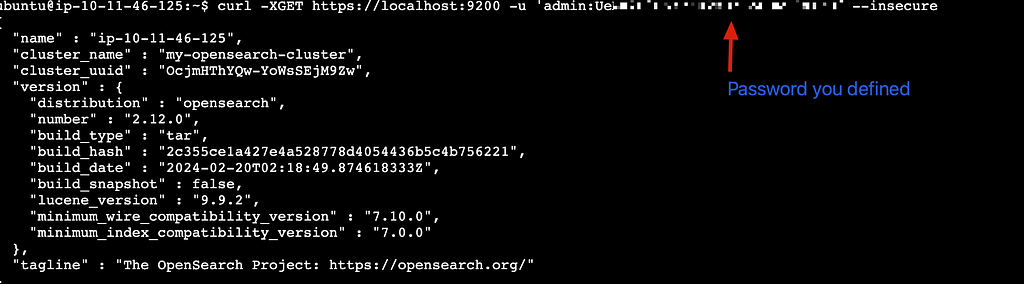
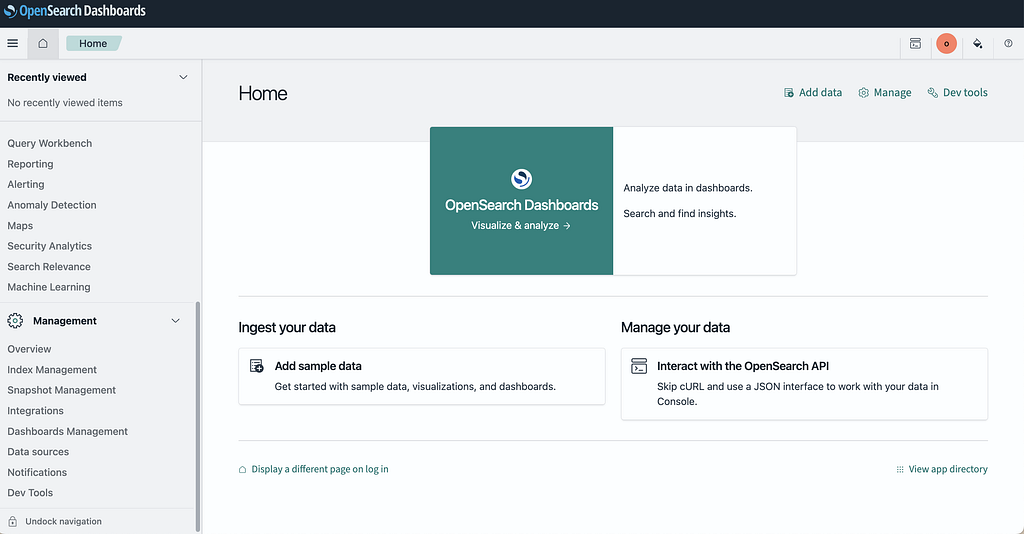
- Access your installation: Once complete, the script displays connection information for both OpenSearch (https://localhost:9200) and OpenSearch Dashboards (http://localhost:5601) interfaces.
By leveraging this automated installation approach, teams can quickly deploy OpenSearch and OpenSearch Dashboards with consistent configurations and proper security settings. The script’s comprehensive logging and verification steps help ensure a successful deployment while highlighting important considerations for production environments.