Automatically Backing Up AWS Cognito User Pools
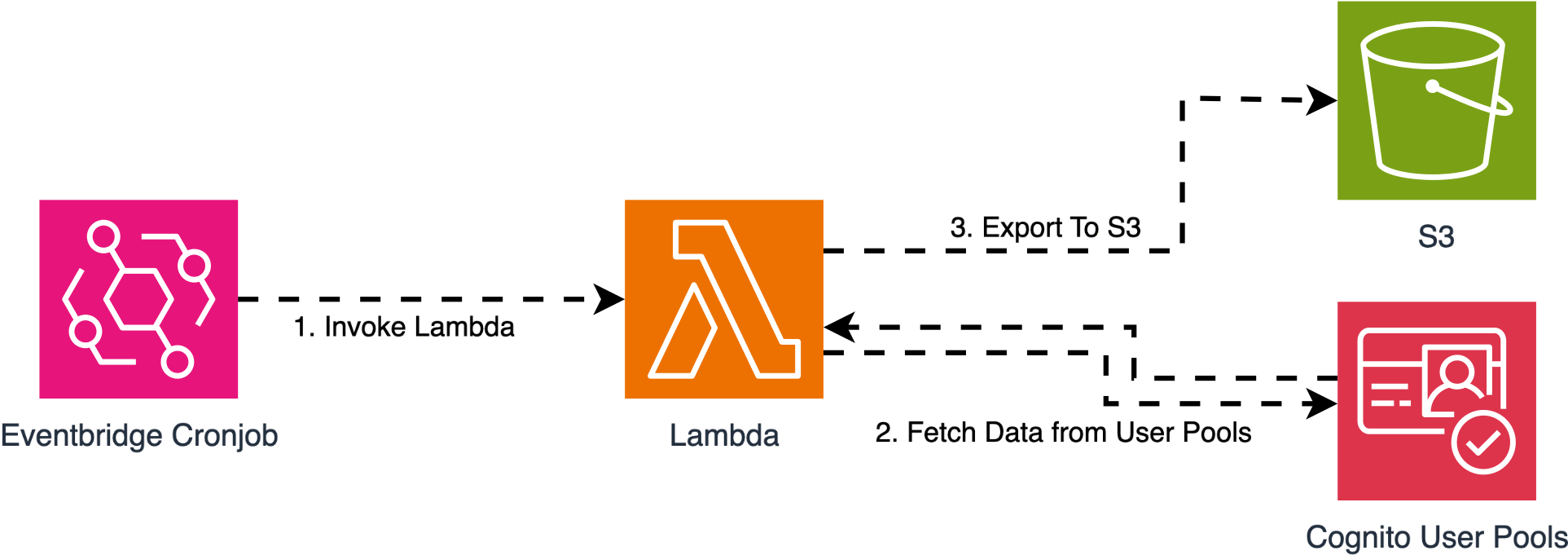
In almost every real-world project that uses AWS Cognito, this question eventually comes up:
"Do we have a backup of our User Pools?"
In a production authentication system, users, groups, and user pool configuration are among the most critical pieces of data. However, AWS Cognito does not provide a built-in, one-click export or backup feature.
In this article I want to walk through a small but production-friendly pattern: a serverless setup that automatically takes a daily snapshot of a Cognito User Pool and stores it in S3.
Goal
The goal is simple: every day, we want a fresh JSON dump of the User Pool (its users, groups, and configuration metadata) sitting in an S3 bucket, organised in a way that we can quickly find the right snapshot when we need it.
This is not a full disaster-recovery story. It is a foundation. From this snapshot you can later build restore tooling, audit pipelines, or cross-region replication.
Architecture Overview
The flow looks like this:
- EventBridge triggers a Lambda function on a daily schedule.
- Lambda reads everything we need from the User Pool: users (with their attributes), groups, and pool settings.
- The function writes the snapshot to an S3 bucket, partitioned by date.
No additional services, no queues, no Step Functions. The whole pipeline is three pieces of plumbing.
Lambda Function Code
Below is a slightly simplified version of the Lambda. It uses the boto3 cognito-idp client to enumerate users and groups, and the s3 client to write the snapshot.
import json
import boto3
from datetime import datetime, timezone

cognito = boto3.client('cognito-idp')
s3 = boto3.client('s3')

USER_POOL_ID = 'us-east-1_XXXXXXXX'
BUCKET = 'my-cognito-backups'

def list_all_users(pool_id):
    users, token = [], None
    while True:
        kwargs = {'UserPoolId': pool_id, 'Limit': 60}
        if token:
            kwargs['PaginationToken'] = token
        resp = cognito.list_users(**kwargs)
        users.extend(resp.get('Users', []))
        token = resp.get('PaginationToken')
        if not token:
            return users

def list_all_groups(pool_id):
    groups, token = [], None
    while True:
        kwargs = {'UserPoolId': pool_id, 'Limit': 60}
        if token:
            kwargs['NextToken'] = token
        resp = cognito.list_groups(**kwargs)
        groups.extend(resp.get('Groups', []))
        token = resp.get('NextToken')
        if not token:
            return groups

def lambda_handler(event, context):
    now = datetime.now(timezone.utc)
    snapshot = {
        'taken_at': now.isoformat(),
        'pool': cognito.describe_user_pool(UserPoolId=USER_POOL_ID)['UserPool'],
        'users': list_all_users(USER_POOL_ID),
        'groups': list_all_groups(USER_POOL_ID),
    }
    key = f"{now.strftime('%Y/%m/%d')}/prod-user-pool_{now.strftime('%Y%m%d_%H%M%S')}.json"
    s3.put_object(
        Bucket=BUCKET,
        Key=key,
        Body=json.dumps(snapshot, default=str),
        ContentType='application/json',
    )
    return {'status': 'ok', 'key': key}
A few details worth noting:
- Both
list_usersandlist_groupsare paginated. The helpers above drain every page so we do not silently truncate large pools. describe_user_poolgives us the pool's configuration (policies, attribute schema, MFA, lambda triggers, etc), which is the part you really do not want to lose track of.default=stris there sodatetimefields from Cognito serialise cleanly into JSON.
S3 Folder Structure
The Lambda writes each snapshot under a year/month/day prefix:
2025/
 └── 03/
     └── 08/
         ├── prod-user-pool_20250308_010012.json
         └── ...
This layout makes it easy to list "what we had on a given day" without scanning the entire bucket. It also plays nicely with S3 lifecycle policies if you want to age out old snapshots (for example, keep daily for 30 days, then weekly for 6 months).
EventBridge Schedule
EventBridge fires the Lambda once a day. A simple cron rule does the job:
cron(0 1 * * ? *)This runs every day at 01:00 UTC. Pick a time that is comfortably outside your peak traffic window so the snapshot does not collide with normal authentication load.
IAM Permissions
The Lambda execution role needs read access to Cognito and write access to the S3 bucket. The relevant policy statement looks like this:
{
  "Effect": "Allow",
  "Action": [
    "cognito-idp:ListUsers",
    "cognito-idp:ListGroups",
    "cognito-idp:DescribeUserPool"
  ],
  "Resource": "arn:aws:cognito-idp:us-east-1:ACCOUNT_ID:userpool/us-east-1_XXXXXXXX"
},
{
  "Effect": "Allow",
  "Action": ["s3:PutObject"],
  "Resource": "arn:aws:s3:::my-cognito-backups/*"
}
Keep the role narrow: read what you must, write only to the backup bucket prefix. Resist the temptation to attach broader managed policies.
Limitations and What This Backup Is (and Is Not)
What Is Included
The snapshot contains user attributes (email, phone, custom attributes), group memberships, and the pool's configuration. That is enough to reconstruct the pool's shape and audit its contents.
What Is NOT Included
Critically, passwords are not in the snapshot. Cognito never exposes user password hashes via the API, so this approach cannot restore credentials. Users restored from this backup will need to go through password reset.
MFA secrets are also excluded for the same reason.
What This Means in Practice
If the User Pool is wiped and you restore from snapshot, every user will need to set a new password. That is painful, but it is still better than losing the user identities entirely. For most production workloads this is an acceptable RPO; for stricter scenarios you would need a redundant pool replicated in real time, which is a different and much larger problem.
Security Considerations
The bucket holding these snapshots contains PII. Treat it accordingly:
- Enable default SSE-KMS encryption with a dedicated key.
- Block all public access at the bucket level.
- Restrict the Lambda role and any read role to specific IAM principals — no wildcard
*in the resource ARN. - Turn on S3 access logging so you have an audit trail of who reads the snapshots.
- If the pool stores especially sensitive attributes, consider filtering them out at backup time rather than capturing everything.
Final Thoughts
This is a deliberately small pattern. Three components — EventBridge, Lambda, S3 — and a daily JSON dump. The point is to have a backup at all, with predictable structure, predictable cost, and predictable failure modes.
From here you can extend it: encrypt with a customer-managed KMS key, replicate the bucket cross-region, build restore tooling that creates a fresh User Pool from the JSON, or feed the snapshots into an audit pipeline.
If you are running Cognito in production, having a daily backup like this is one of those things you hopefully never need — but will be very glad to have when you do.