Building a Zero Trust Architecture
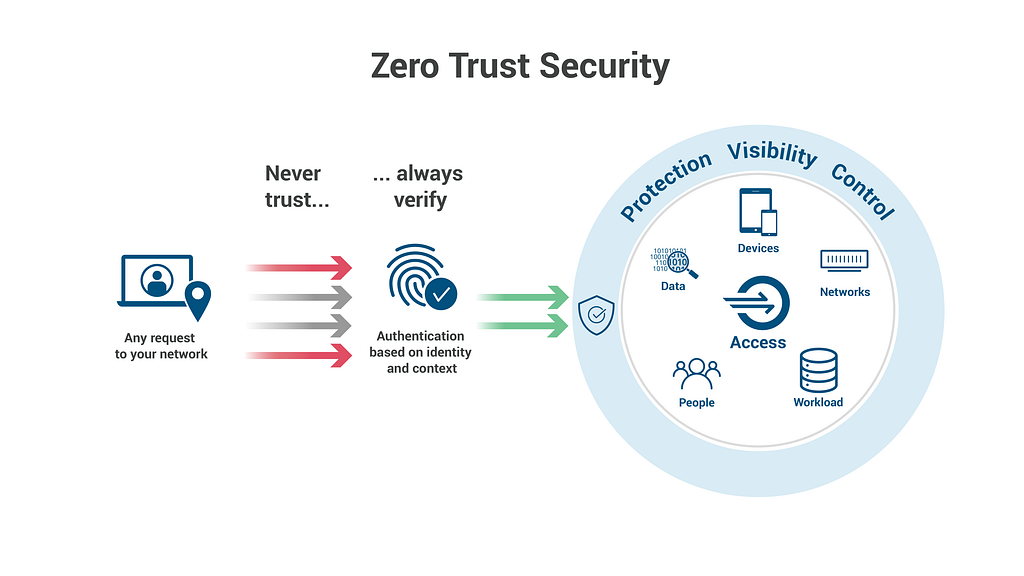
In one of my previous article, we explored what Zero Trust is and why it’s a critical security model for modern environments. Now, it’s time to take that understanding and turn it into action. Implementing Zero Trust may seem like a huge undertaking, but breaking it down into clear, manageable steps makes the process much more approachable. In this article, we’ll walk through how to implement Zero Trust effectively using AWS tools, from assessing your environment to securing identities and protecting data.
By the end, you’ll have a practical roadmap for applying Zero Trust in your cloud infrastructure, with real-world examples to guide you. Whether you’re just getting started or refining your security posture, these actionable steps will help you build a robust and secure environment. Let’s dive in!
Zero Trust Implementation
Implementing Zero Trust can feel overwhelming, but breaking it down into clear, actionable steps makes the process manageable and effective. Here’s how to do it:
Step 1: Assess Your Environment
The first step is to get a comprehensive view of what you’re working with — mapping your resources, understanding your risks, and knowing where your critical assets are. This sets the stage for applying Zero Trust in the right areas.
- Map Your Assets
- Identify the critical data you’re protecting: customer information, sensitive financial records, internal databases, etc.
- Applications and Services: Are your applications running on EC2 instances, Lambda functions, or containers? These need proper access management.
- Users and Devices: Who’s accessing your systems, and from what devices? Are employees using personal devices? What about contractors or third-party vendors?
- Tools to Help: Use AWS Resource Groups to organize resources by business function or risk level. This will help you keep track of what you’re protecting and where the highest risks are located.
- Identify High-Risk Areas
- Look for public-facing applications — especially web services or APIs that may be targeted by attackers.
- Understand where sensitive data is stored (e.g., S3 buckets, RDS instances, or EFS). Classify your data into different sensitivity levels and ensure high-risk assets are locked down.
- Tools like AWS Trusted Advisor can help you identify configuration weaknesses or security gaps in your environment.
Step 2: Secure Identities
In Zero Trust, the identity of every user and application must be authenticated and authorized continuously. This is where IAM (Identity and Access Management) comes into play.
- Implement Robust IAM Practices
- Set up specific IAM roles for different access levels, from admins to developers to read-only users. For instance, use IAM policies to define access to different services (like EC2, S3, DynamoDB) and make sure they follow the principle of least privilege.
- Don’t forget to audit IAM roles regularly — use AWS IAM Access Analyzer to ensure policies are in line with best practices and avoid overly permissive access.
- Require MFA for All Users
- Multi-factor Authentication (MFA) adds an essential layer of security. Ensure MFA is enabled for all users accessing sensitive resources, especially for IAM users with elevated privileges.
- Use AWS MFA or even hardware MFA devices for high-risk environments (like privileged admin roles). This ensures an attacker can’t access your AWS environment just by compromising a password.
- Centralized Identity Management
- Use AWS Identity Center for managing user access across multiple AWS accounts. This service makes it easier to manage permissions centrally and enforce consistent identity policies across your organization.
- Federated identity management via AWS Cognito can also be a great option for applications that require user authentication.
Step 3: Protect Data
Data is always a prime target for attackers, so Zero Trust requires strong controls around data access and encryption.
- Encrypt All Data at Rest and in Transit
- Encrypt your data with AWS KMS (Key Management Service) for encryption at rest. For example, use KMS to manage encryption keys for your S3 buckets or RDS databases.
- For encryption in transit, make sure all communication between services is secured with SSL/TLS. When deploying microservices or APIs, use AWS API Gateway with TLS to ensure encrypted connections.
- Classify Data Based on Sensitivity
- Classify your data by sensitivity — high, medium, or low. For high-sensitivity data like PII (personally identifiable information), enforce stricter access controls and encryption policies.
- S3 Bucket Policies: Use S3’s built-in policies to control access. Restrict access to sensitive data using IAM policies that allow only authorized users and services to access certain buckets.
- Additionally, consider data masking or tokenization for sensitive data, especially when you have non-production environments or third parties accessing it.
Step 4: Secure the Network
Network security in Zero Trust is about limiting access to only the resources that are needed and continuously monitoring for suspicious activity.
- Use Network Segmentation
- AWS VPC (Virtual Private Cloud) allows you to logically isolate your resources. For example, you can segment your database layer into its own private subnet, limiting access from only authorized services.
- Use AWS Transit Gateway for cross-account networking and centralizing your VPC communications securely. This helps ensure that your network is segmented appropriately without letting traffic cross unnecessarily.
- Enable Firewalls and DDoS Protection
- Protect your web apps and APIs with AWS WAF (Web Application Firewall). It allows you to create custom rules to block malicious traffic, like SQL injections or cross-site scripting.
- For DDoS protection, enable AWS Shield to mitigate attacks against your applications. AWS Shield Standard is included with all AWS services, but Shield Advanced offers additional features like real-time attack visibility and 24/7 DDoS cost protection.
Step 5: Continuous Monitoring and Response
Zero Trust requires constant vigilance. Your cloud environment should be continuously monitored to detect unusual behavior and automatically respond to potential threats.
- Set Up Monitoring Tools
- Use AWS CloudTrail to log and track all API calls and activity within your AWS environment. CloudTrail records every action taken in your AWS account, making it a critical part of your security posture.
- Enable AWS GuardDuty for threat detection. GuardDuty uses machine learning to identify unusual patterns and threats like unauthorized access or compromised instances.
- Use AWS Security Hub to centralize security findings and streamline the process of investigating and responding to incidents.
- Automate Responses to Threats
- When an anomaly is detected, don’t wait — automate responses. With AWS Lambda, you can trigger automated actions, like isolating a compromised instance or alerting an admin when suspicious activity is detected.
- Set up AWS CloudWatch alarms to get notified about potential security issues, like excessive failed login attempts or unusual traffic spikes, and configure automatic remediation actions.
Step 6: Enforce Policies with Automation
Consistency is key in Zero Trust. Automation ensures that your security policies are enforced without manual intervention.
- Leverage Tools for Automation
- Use AWS Config to continuously assess your environment for compliance with your Zero Trust policies. For instance, ensure that all S3 buckets are encrypted and that IAM roles are correctly defined.
- With AWS Systems Manager, you can automate the process of patching EC2 instances, ensuring that your instances are always up to date and secure.
- Use AWS Organizations for managing multiple accounts and applying Service Control Policies (SCPs) across all your accounts to enforce organization-wide security standards.
In Conclusion, implementing Zero Trust in the cloud is a journey that involves protecting identities, securing data, segmenting networks, continuously monitoring activity, and automating policy enforcement. With AWS-native tools like IAM, GuardDuty, CloudTrail, and KMS, you can build a comprehensive Zero Trust architecture that scales with your business needs.
Common Challenges of Zero Trust
Implementing Zero Trust comes with a few challenges:
- Complexity and Integration
Transitioning from traditional security models to Zero Trust requires reconfiguring systems, access controls, and network boundaries.
Tip: Start small with IAM and sensitive data, then expand gradually. - Performance Overheads
Continuous validation and authentication can add latency, affecting user experience, especially in high-traffic environments.
Tip: Use load balancing and auto-scaling to minimize impact. - Cultural Resistance
Shifting to Zero Trust can face internal pushback from users used to open access.
Tip: Educate teams on the security benefits and necessity of this shift. - Cost of Implementation
The tools, technologies, and expertise required can make Zero Trust seem costly.
Tip: Leverage cloud-native services like AWS IAM and GuardDuty to manage costs. - Managing Distributed Environments
In hybrid or multi-cloud environments, managing users and workloads can become complex.
Tip: Automate and use orchestration tools to streamline management.
While the challenges are real, the long-term security benefits make it well worth the effort.
Conclusion

Implementing Zero Trust is undeniably complex and may require a significant shift in how your environment operates. It’s not a quick fix but a process that involves carefully assessing your infrastructure and making strategic changes to how access, data, and networks are managed.
While the journey can feel daunting, taking it step by step makes it more manageable. Start by focusing on the most critical areas, and as you build momentum, you’ll gradually create a more secure environment. Though it may take time and effort, the security benefits of adopting Zero Trust make the investment worthwhile in the long run.
CREDITS
- https://www.fortinet.com/resources/cyberglossary/how-to-implement-zero-trust
- https://www.nccoe.nist.gov/projects/implementing-zero-trust-architecture
- https://www.catonetworks.com/zero-trust-network-access/how-to-implement-zero-trust/
- https://www.microsoft.com/insidetrack/blog/implementing-a-zero-trust-security-model-at-microsoft/
- https://www.zscaler.com/zpedia/how-to-implement-zero-trust