How to Stop AWS Non-Prod Resources on a Schedule, Karpenter Included
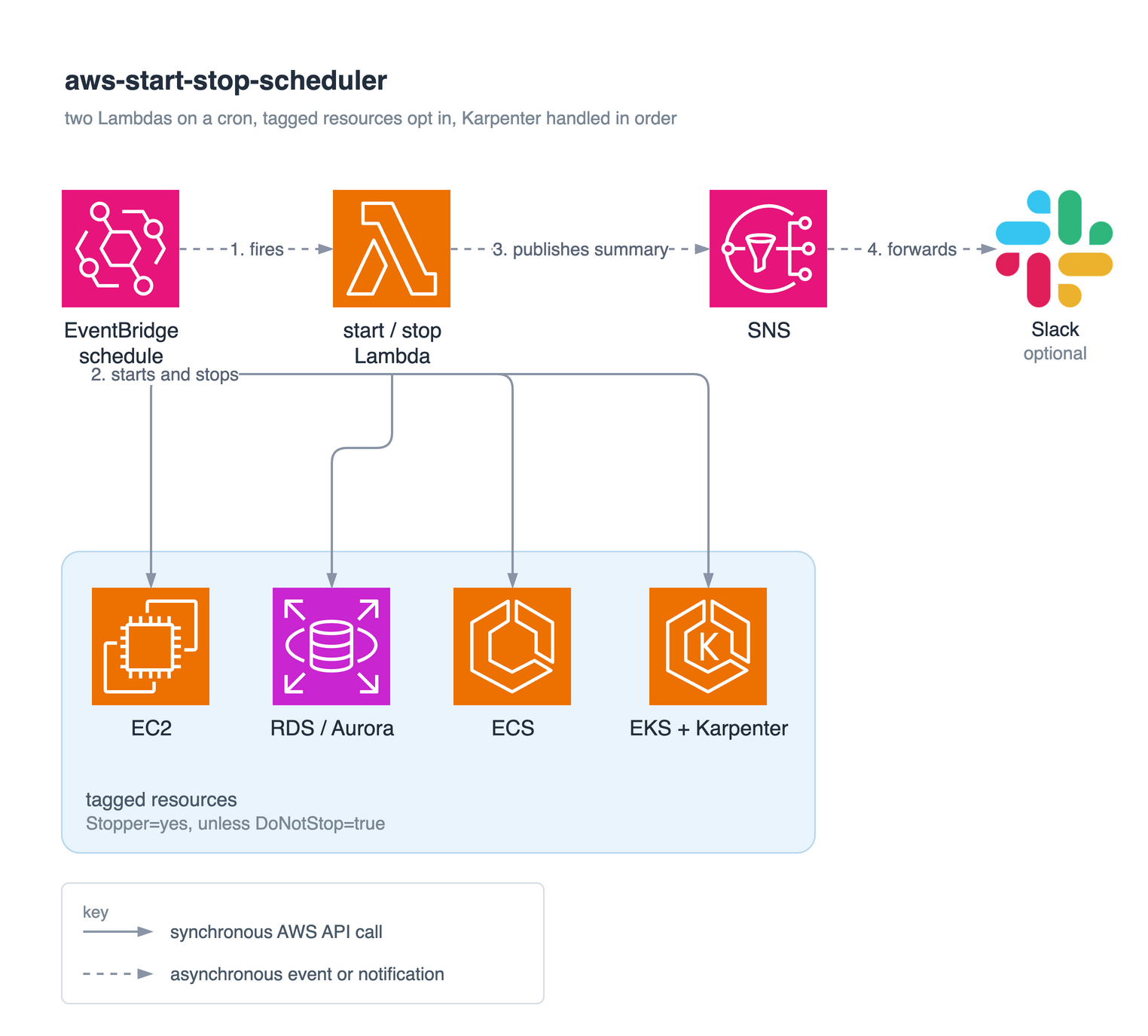
Most development environments do not need to run 24 hours a day. Stopping them is not the hard part. Keeping them stopped is.
The idea is simple. Run a Lambda every evening to stop everything tagged for scheduling, then run another one in the morning to start it back up. Nobody is using the dev cluster at 3am on a Sunday, but the EC2 instances, RDS databases, and EKS nodes are still running and still costing money.
Then there's Karpenter. Delete one of its nodes and, a few seconds later, it provisions a new one. From Karpenter's point of view, that's exactly what it's supposed to do. That one detail is why this project took more than an afternoon.
Scheduling AWS resources with tags
The scheduler itself is quite simple. Two Lambda functions, one that starts and one that stops, each on its own EventBridge schedule in whatever timezone you configure.
Instead of maintaining allow lists, resources opt in with a tag (Stopper=yes by default). A second tag is the safeguard: DoNotStop=true always wins, even on a resource the scheduler otherwise manages.
# managed by the scheduler
aws ec2 create-tags --resources i-0123 --tags Key=Stopper,Value=yes
# never stop this one, even if it has the schedule tag
aws ec2 create-tags --resources i-0456 --tags Key=DoNotStop,Value=true
Put it on the shared bastion, or on a database somebody is mid-migration on. A stop job without one is how you find out which things people quietly depend on. Each resource type is also handled on its own, so if stopping RDS fails, EC2 still stops and the run reports a partial result instead of discarding the batch.
Every service stops differently
EC2 is straightforward. ECS is not, because an ECS service has no stop operation at all, only a desired task count.
Rather than keeping that number somewhere else, the scheduler writes the current desired count onto the service as a tag and then scales it to zero. The morning run reads the tag back and restores it. No DynamoDB table, no S3 bucket to keep in sync. The state lives on the resource it describes.
Scaling Karpenter to zero, in the right order
Everything above is ordinary AWS API work. Karpenter is different, because it is a controller whose entire purpose is to notice missing capacity and replace it. Terminate nodes before you stop Karpenter and it starts building new ones immediately.
This is the order that works:
# 1. stop the controller first, or it re-provisions everything you remove
kubectl scale deploy/karpenter -n karpenter --replicas=0
# 2. delete Karpenter's node objects (async: the finalizer can't run with the
#    controller down, so --wait would just block until timeout)
kubectl delete nodeclaims --all --wait=false
# 3. scale the managed node group down
aws eks update-nodegroup-config --cluster-name CLUSTER --nodegroup-name NG \
  --scaling-config minSize=0,maxSize=1,desiredSize=0
# 4. terminate leftover Karpenter nodes by the tag it stamps on every one
aws ec2 describe-instances \
  --filters "Name=tag-key,Values=karpenter.k8s.aws/ec2nodeclass" \
            "Name=instance-state-name,Values=running" \
  --query 'Reservations[].Instances[].InstanceId' --output text \
  | xargs -r aws ec2 terminate-instances --instance-ids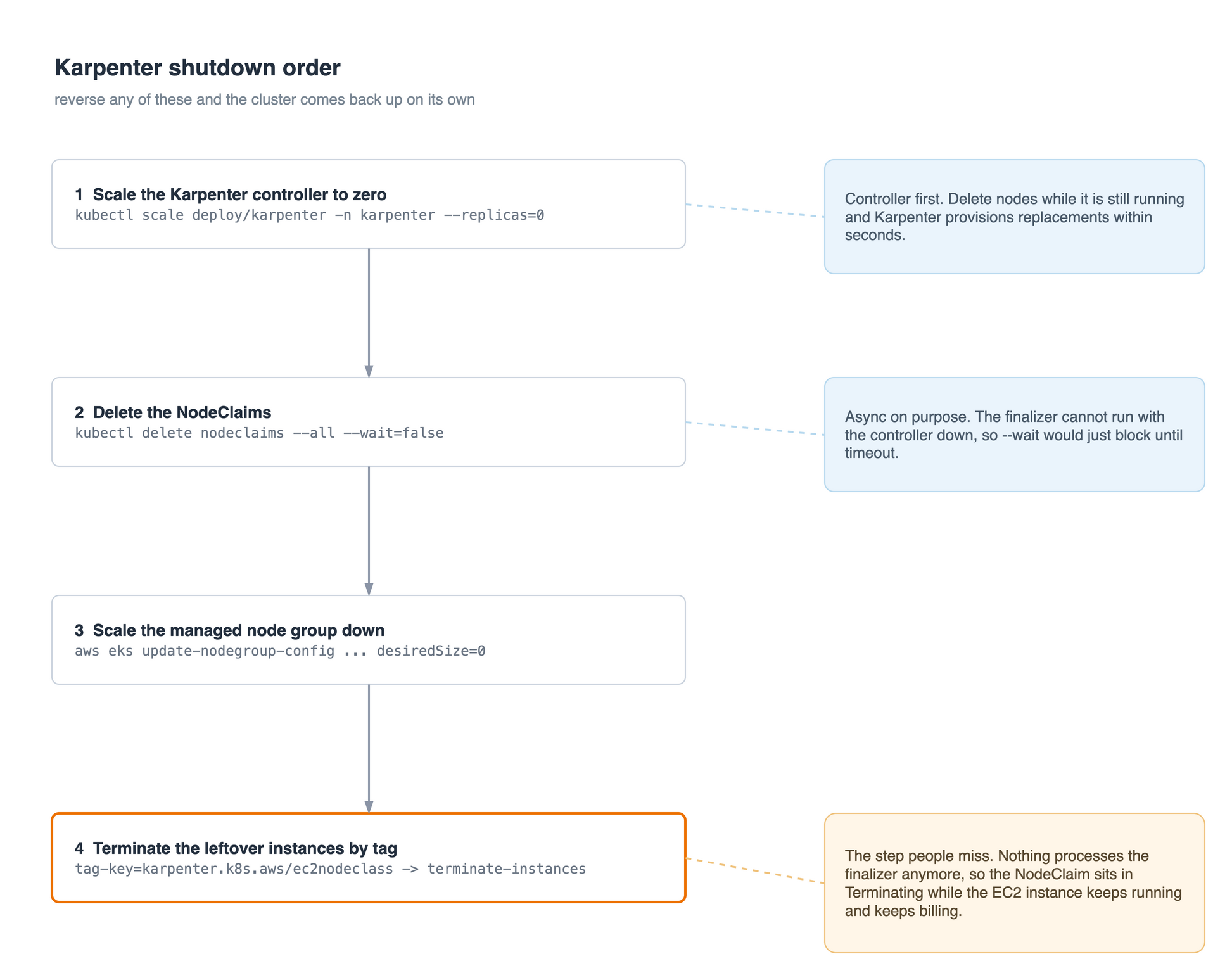
Step 4 is the one that is easy to miss, and here is why it has to be there. A NodeClaim carries a finalizer, a cleanup hook that only the Karpenter controller runs. Step 1 scaled that controller to zero, so nothing processes the finalizer anymore. The NodeClaim sits in Terminating while the real EC2 instance keeps running and keeps billing. Deleting the NodeClaim expresses the intent. Terminating the instance by tag is what actually saves money.
You could reverse the order and let Karpenter drain everything gracefully. You would also open a window where it can provision replacement nodes. This project prefers predictable behaviour over graceful shutdown.
One assumption worth stating: this expects Karpenter to run on a managed node group, which is the node group step 3 scales down. If your controller lives somewhere else, that step needs to point at wherever it actually runs.
Deploying it
The terraform/ directory provisions the whole thing in one apply: both Lambdas, their IAM role, the SNS topic, the EventBridge schedules, the Function URLs, and the optional Slack forwarder.
cd terraform
cp terraform.tfvars.example terraform.tfvars
# region, the two crons, and which resource types to enable

tofu init
tofu plan
tofu apply
EC2 and RDS are on by default and everything else is opt-in (ENABLE_AURORA, ENABLE_ECS, ENABLE_EKS_NODEGROUP, ENABLE_KARPENTER), so a minimal deploy stays minimal. Karpenter is the only feature that pulls the kubernetes package into the bundle, so leaving it off keeps the deployment small.
It is also the only feature with a prerequisite outside AWS, and it is the one people miss. The Lambda has to talk to the Kubernetes API, and IAM permissions alone will not get it in. The execution role has to be mapped to a Kubernetes identity as well, through the aws-auth ConfigMap on older clusters or an EKS access entry on newer ones, with RBAC to patch the Karpenter deployment and to list and delete nodeclaims. Without that mapping the cluster returns 401 or 403 no matter how correct the IAM policy is.
Safe by default
The example config ships with dry_run = true. Nothing gets stopped. The Lambdas log and report exactly what they would have done. Watch a few scheduled cycles, confirm the right resources are being selected, then turn dry-run off.
There is also an optional verification stage that waits for resources to reach their expected state, retries transient AWS failures with exponential backoff, and fails immediately on permanent errors like a missing permission.
The Lambda Function URLs use IAM auth rather than an API key in a query string. A key on a public URL leaks into request logs and hands whoever finds it the ability to shut your environment down. In normal use nobody calls those URLs anyway, EventBridge invokes the functions directly, and the execution role is scoped with tag-based conditions so anything untagged is out of reach.
Where it stops
One global start time and one global stop time, not per-resource hours in a tag. Per-resource schedules would be useful and would also make this a considerably bigger project.
There are no built-in cost estimates either. A number that ignores EBS storage still billing, reserved-instance coverage, Aurora pricing and Spot versus On-Demand would be confidently wrong. Cost Explorer answers that question properly.
Two AWS behaviours to know before you lean on this. A stopped Aurora cluster starts itself again after seven days, so a long holiday will not keep it down on its own. And stopping RDS does not stop storage charges, you are saving compute, not storage.
For most non-prod, shutting everything down outside working hours is one of the simplest FinOps wins available, a weekend of work against a recurring bill. The automation is not the difficult part. The shutdown order is, especially with Karpenter in the cluster, and that is the part I would read twice before trusting any tool that claims to stop your environment.
The code is MIT licensed and on GitHub: github.com/Bungic/aws-start-stop-scheduler.