Introduction to Cloud Security

Did you know that over 60% of organizations have experienced a cloud security breach in the past year? Imagine logging into your cloud account and seeing a jaw-dropping $10,000 bill for services you never set up. Somehow, someone gained access to your account, creating costly services and resources without your knowledge. This scenario may sound extreme, but it’s a real risk. Especially if your cloud security practices aren’t up to par.
In today’s digital age, where businesses rely heavily on cloud computing; understanding and implementing cloud security is not just an option, it’s a necessity. As organizations transition to the cloud, the potential for security breaches grows, highlighting the critical importance of safeguarding sensitive data and resources.
In this article, we’ll explore what cloud security entails, its key components, best practices to follow, compliance requirements, and the importance of having a solid incident response plan. We’ll also review real-world examples to understand the consequences of poor cloud security and lessons learned from past incidents.
Understanding Cloud Security
Cloud security encompasses a set of practices, policies, and technologies designed to keep your cloud computing environment safe. As businesses increasingly adopt cloud services for their flexibility and scalability, effective cloud security becomes essential.
A common misconception is that cloud services are inherently secure, leading some to believe that simply choosing a reputable provider like AWS guarantees complete protection. While major providers implement strong security measures, risks still exist. Security is a shared responsibility: providers secure the infrastructure, while customers must actively manage their own data security.
Understanding this shared responsibility is crucial. For instance, while a provider ensures the physical security of data centers, customers need to focus on access controls, data encryption, and compliance with relevant regulations. By recognizing the roles both parties play, organizations can better protect their cloud resources from unauthorized access and breaches.
Key Components of Cloud Security
Data Protection
At the heart of cloud security lies data protection. It involves various strategies to keep your data safe from unauthorized access and loss.
Encryption of Data at Rest and in Transit
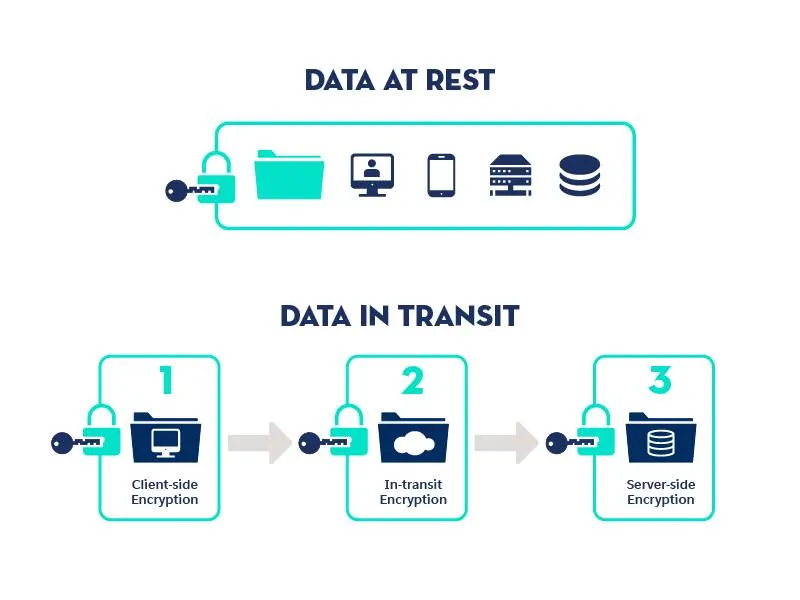
Imagine transforming sensitive information into a secret code. Through encryption, even if data is stolen, unauthorized individuals encounter nothing but a jumble of indecipherable text. Without the decryption key, they gain nothing of value. It’s important to understand the two main states of data: data at rest, which refers to information stored on devices or servers, and data in transit, which describes information actively moving between systems or users. Encrypting both types is essential for maintaining security.
- Data at Rest: When using services like Amazon S3 to store files, enabling server-side encryption protects your data while it is saved. This acts as a strong safeguard, ensuring that your information remains secure even in the event of a breach.
- Data in Transit: On the other hand, when data is transmitted between systems or users, protocols like Transport Layer Security (TLS) come into play. TLS encrypts this data in transit, effectively shielding it from interception as it moves between servers and clients. This dual-layered approach guarantees that whether your data is at rest or in transit, it remains secure throughout its lifecycle.
Backup Strategies
Consider what happens if a cyberattack occurs. A comprehensive backup strategy is essential for data recovery in such scenarios . It’s like having an emergency exit plan. Regularly backing up your data means you can quickly restore critical information when needed.
- For instance, AWS Backup provides automated solutions that streamline the backup process for various AWS services. By scheduling regular backups, organizations can maintain data integrity without constant manual intervention, offering peace of mind knowing that their data can be recovered promptly.
Identity and Access Management (IAM)
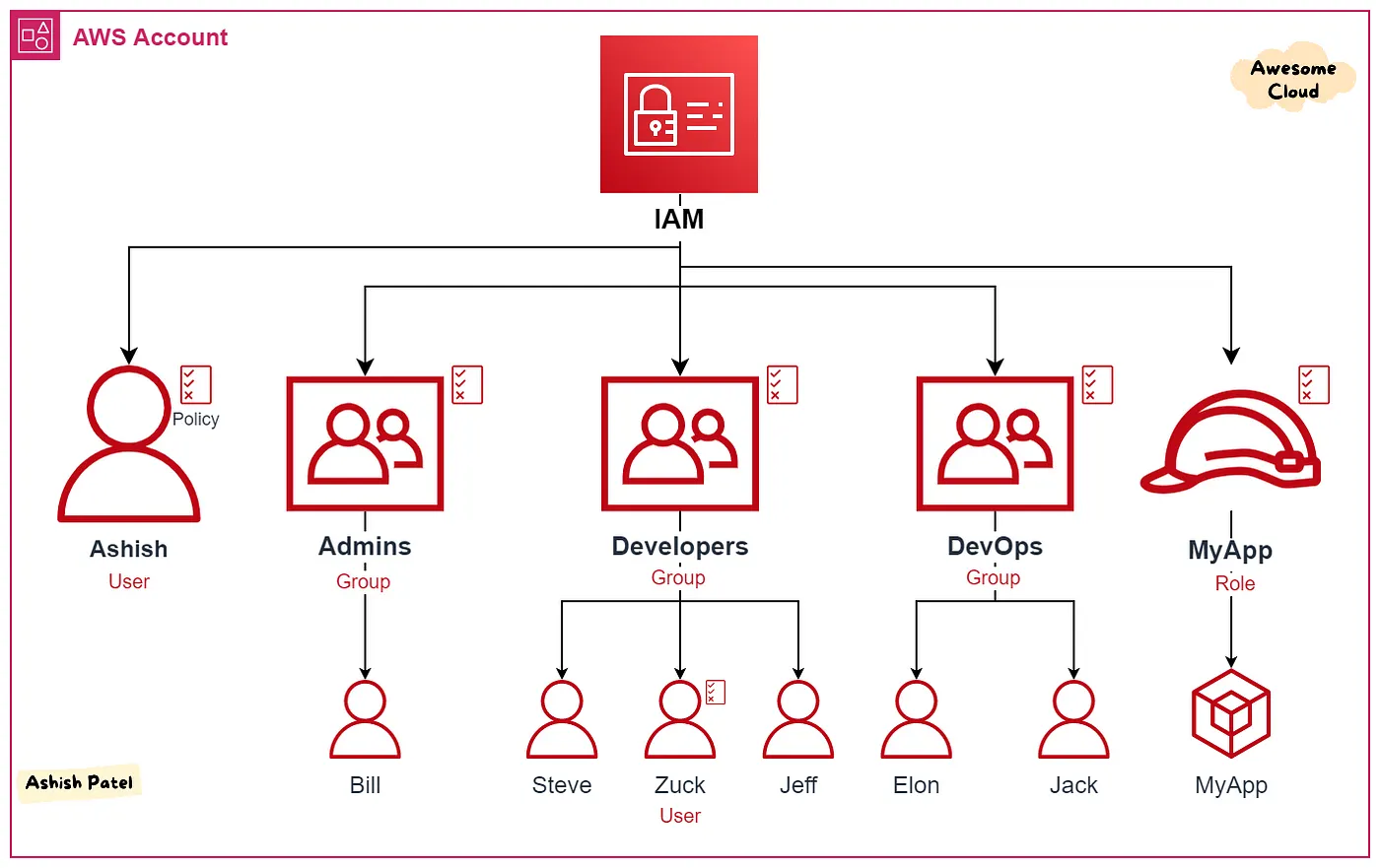
Identity and Access Management (IAM) is essential for controlling who has access to your cloud environment and what actions they can perform. Implementing Role-Based Access Control (RBAC) ensures that users only have the permissions necessary for their job functions, which minimizes the risk of accidental or malicious changes to your cloud resources.
For instance, consider a scenario in a software development company:
- Developers might be granted access to deploy applications but not to modify network configurations. This separation ensures they can perform their job — building and deploying code — without the ability to make potentially disruptive changes to the network.
- DevOps engineers, on the other hand, often require broader permissions. They might need access to the deployment tools and the ability to modify infrastructure settings. However, it might be unnecessary for them to have permission to access sensitive data directly, such as customer information stored in databases.
- In a different case, QA testers may need to run tests against the production environment, but they shouldn’t have permissions to deploy code directly. They could be given read-only access to certain resources and the ability to trigger automated tests without affecting production systems.
By clearly defining these roles, organizations can maintain security while allowing teams to function effectively.
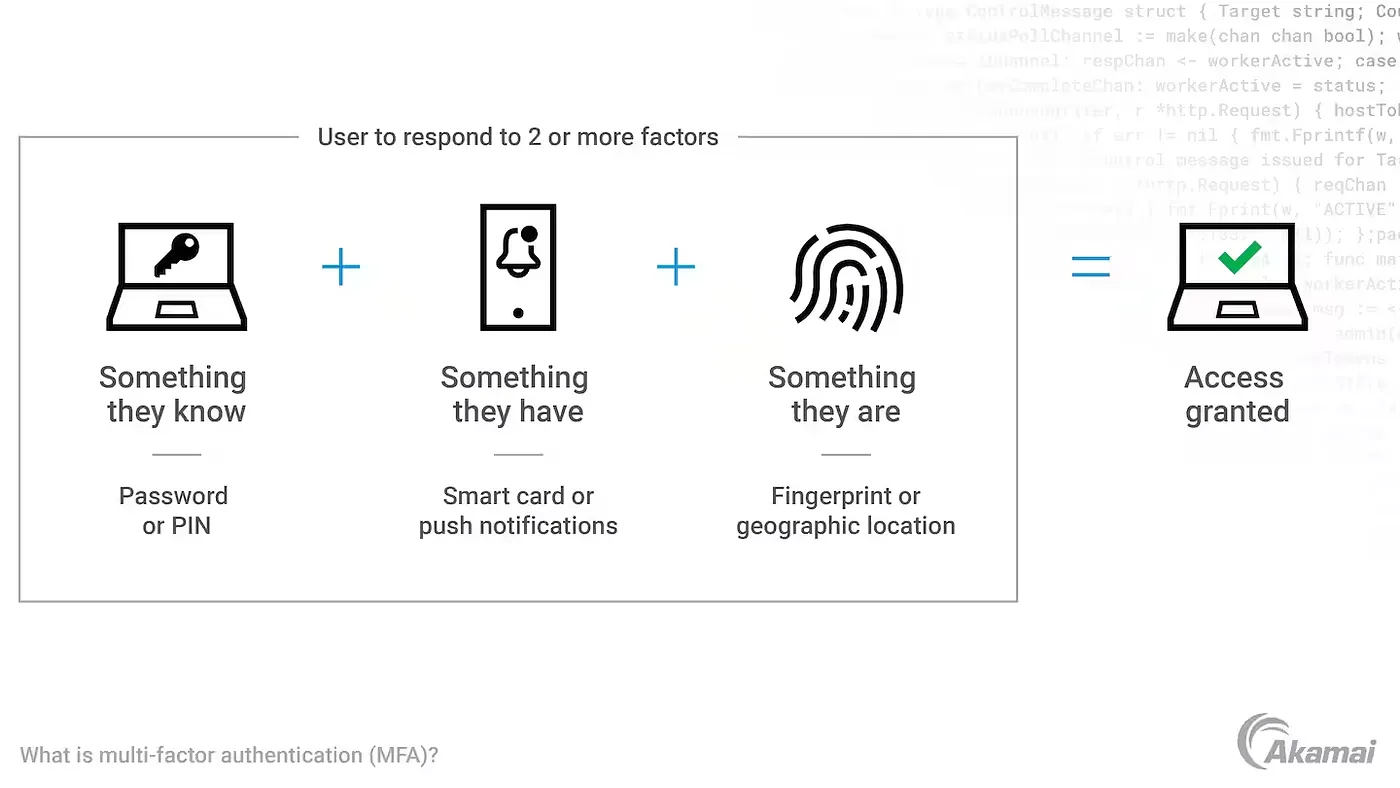
Another key feature of IAM is Multi-Factor Authentication (MFA). MFA requires users to provide two or more verification factors — such as a password and a one-time code sent to their phone — before gaining access to sensitive information. This adds an important layer of security, making it much harder for unauthorized individuals to gain access, even if they have obtained a user’s password.
Network Security
Network security is like the fortress that protects your cloud infrastructure from external threats. Without proper defenses, your cloud environment is vulnerable to intruders looking to steal valuable treasures — your data and applications.
Firewalls and Virtual Private Networks (VPNs)
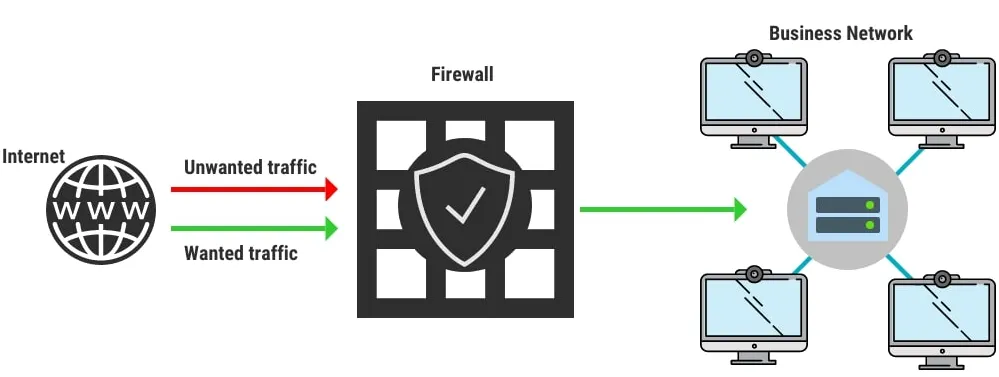
Firewalls are like vigilant guards stationed at the gates of your castle. They monitor and control the traffic coming in and out, ensuring that only authorized visitors can enter. For instance, AWS provides the AWS WAF (Web Application Firewall), which acts as a filter for HTTP/S requests. It blocks malicious traffic before it even reaches your applications, much like a guard who checks visitors for weapons before allowing them inside.
Consider VPNs as secure, secret tunnels that connect your castle to remote locations, like your office. These tunnels encrypt your internet traffic, safeguarding your data as it travels between your on-premises network and your cloud resources. With a VPN, your information remains protected, even when traversing public networks — like sending messages through a private passage rather than on a busy street.
Security Groups and Network Access Control Lists (NACLs)
Let’s talk about security groups and NACLs. Security groups are the inner walls of your castle, protecting individual rooms (instances) within. Each room has specific rules about who can enter and what activities can take place inside. By defining these rules at the instance level, you ensure that only the right people have access to the right resources.
On the other hand, Network Access Control Lists (NACLs) act like the castle’s outer walls, providing a broader level of security. These walls set the rules for entire sections of your castle (subnets). By combining the protective features of both security groups and NACLs, you create a multi-layered defense system. This approach minimizes exposure to threats, allowing your cloud environment to operate securely and efficiently.
Best Practices for Cloud Security
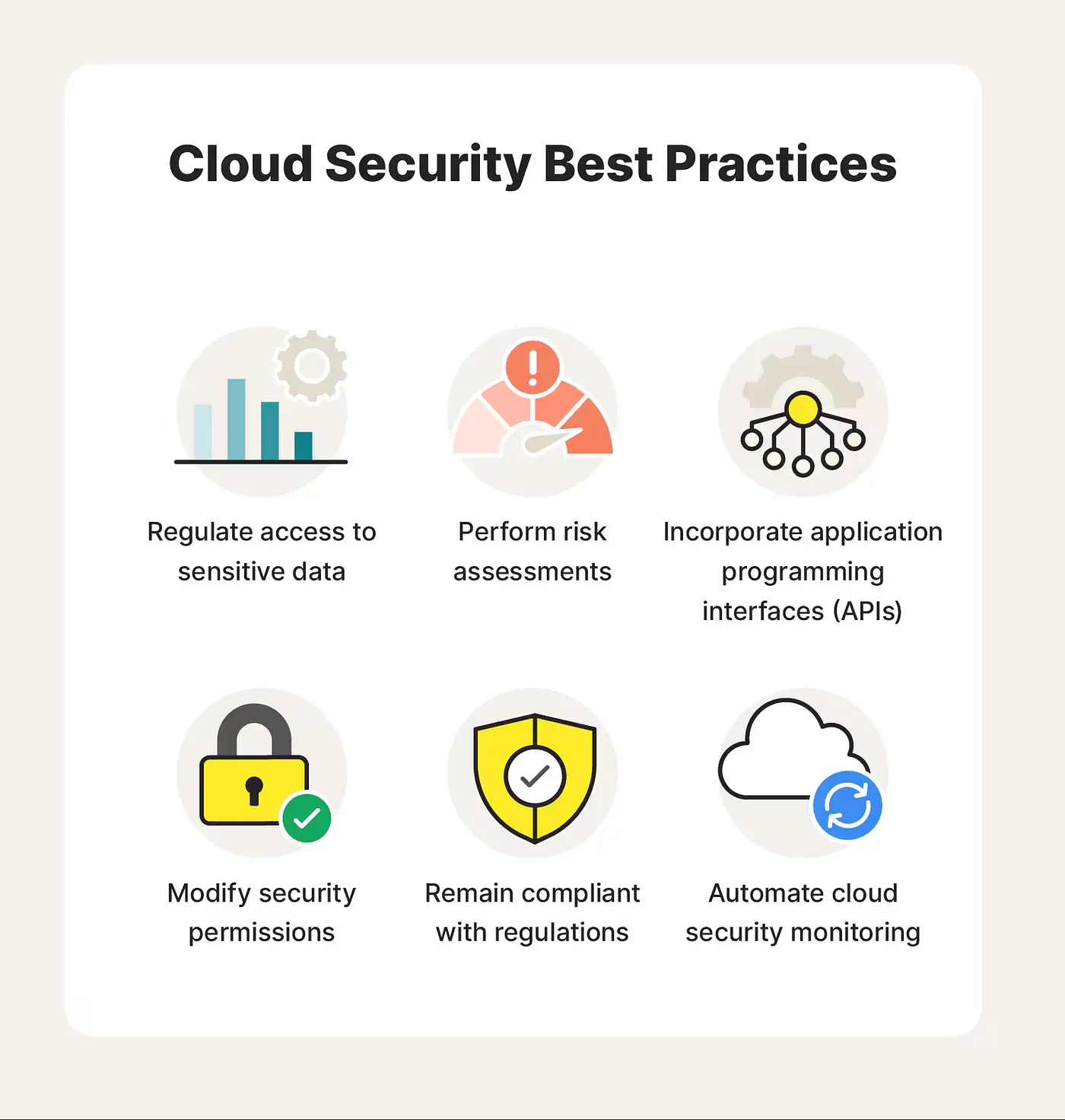
Regularly Updating and Patching Systems
Regular updates and patches are the maintenance crews who reinforce your castle’s walls. Cyber threats are always evolving, and without timely updates, your defenses can become weak, allowing intruders to exploit vulnerabilities. Establishing a routine for reviewing and applying updates to your software and infrastructure is essential. In AWS environments, utilizing AWS Systems Manager acts like a dedicated team that automates the patch management process, ensuring your defenses remain strong without placing an excessive burden on your IT staff.
Conducting Security Audits and Assessments
Conducting regular security audits is similar to inviting trusted knights to inspect your castle’s defenses. These audits help identify potential weaknesses and blind spots that might have been overlooked. Engaging third-party security professionals can provide an external perspective on your security posture. With tools like AWS Inspector, which automatically assesses applications for vulnerabilities, organizations can proactively address risks, reinforcing their defenses against potential breaches.
Implementing Logging and Monitoring
Logging and monitoring tools serve as the eyes and ears of your castle, keeping watch for any unusual activities. Services like AWS CloudTrail provide detailed logs of API calls made within your AWS account, allowing you to investigate and respond to potential incidents effectively. Coupled with monitoring tools like Amazon CloudWatch, you can set alerts for suspicious behaviors, ensuring a rapid response to any security threats. Maintaining logs not only helps with compliance efforts but also acts as a vital resource during incident investigations, giving you insight into how to bolster your security measures further.
Compliance and Regulations
Compliance and regulations are the guiding principles that help safeguard your cloud infrastructure. Just as a castle must adhere to local laws and customs, organizations handling sensitive information must navigate various regulations to protect their data and maintain trust.
Overview of Relevant Regulations (e.g., GDPR, HIPAA)
Understanding data protection regulations is essential. For example:
- General Data Protection Regulation (GDPR): GDPR is the EU’s way of ensuring that its citizens’ personal data stays private and protected. It requires organizations to secure user data, get clear consent for data collection, and be transparent about how the data is used. Non-compliance can lead to steep fines, so if your business handles EU data, following GDPR is essential.
- Health Insurance Portability and Accountability Act (HIPAA): HIPAA sets strict guidelines for protecting patient information in healthcare. It’s all about keeping patient data safe and private. For healthcare providers, following HIPAA is crucial to avoid hefty penalties and maintain trust with patients.
These regulations serve as frameworks to ensure proper data protection measures are in place.
Importance of Compliance in Cloud Security
Compliance is essential not only for safeguarding sensitive data but also for fostering trust with customers. It provides a structured framework to identify and enhance areas of security. Many cloud providers, such as AWS, offer compliance certifications that help organizations meet regulatory standards, simplifying the path to compliance and strengthening overall security.
Incident Response Planning
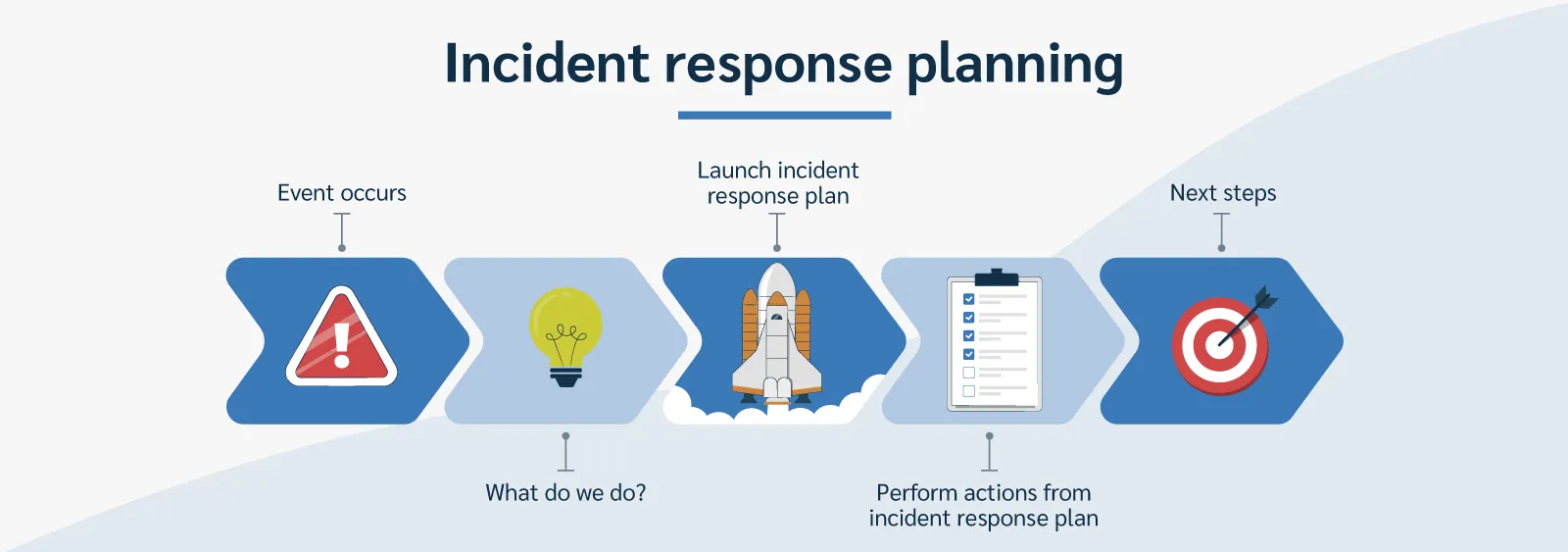
Incident Response Planning is a strategic defense plan for your digital assets, preparing your organization to respond effectively to security breaches. It’s not just about defenses; it’s about readiness to address and recover from potential attacks.
Importance of Having an Incident Response Plan
Imagine your system suddenly goes down, and sensitive data is compromised. Panic, confusion, and the rush to fix things. Without a solid incident response plan, managing a security breach can be chaotic. A well-prepared response plan is like an emergency guidebook that helps you take immediate action to control the damage, restore order, and keep things running smoothly.
Here’s what makes an incident response plan essential:
- Clear Roles and Responsibilities: Knowing who does what in a crisis is crucial. Assigning roles ahead of time means everyone -from IT staff to company leaders- is ready to step in and tackle their part, avoiding confusion and wasted time.
- Effective Communication Strategies: Communication matters, especially under pressure. Your plan should outline how to keep both internal teams and external parties -like customers, regulators, and even the media- informed and reassured.
- Recovery Procedures: Getting back on track is the priority. Your plan should detail the steps for restoring systems and data, with a focus on backups and failover options to reduce downtime and minimize impact.
But having a plan isn’t enough on its own. Regularly running practice drills, like simulations or tabletop exercises, helps your team spot any weaknesses and improve your response. When an incident does happen, you’ll be ready to handle it swiftly and effectively.
AWS Well-Architected Framework
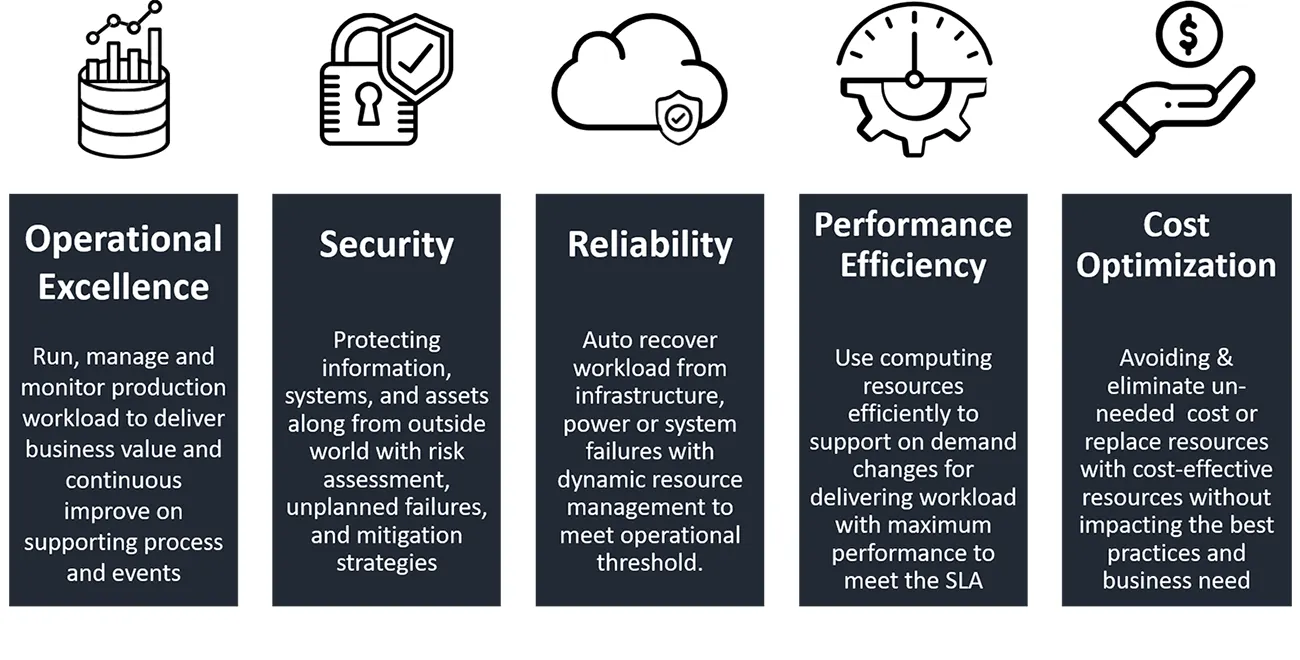
The AWS Well-Architected Framework is a comprehensive set of best practices designed to guide organizations in building secure, resilient, efficient, and high-performing infrastructure on AWS. With its foundation built on the experience of AWS architects and their collective insight into secure cloud architecture, the framework covers key areas critical to cloud security, efficiency, and overall cloud strategy.
Key Pillars of the AWS Well-Architected Framework
Operational Excellence
- This pillar focuses on how effectively you manage and monitor your systems to deliver business value. Emphasizing practices like infrastructure monitoring, logging, and automation, it allows teams to maintain robust operations with minimal disruption.
- For instance, using AWS CloudTrail for logging or AWS Systems Manager for automated management supports proactive operational health and security.
Security
- The security pillar underscores the importance of protecting data, systems, and assets by implementing identity and access management (IAM), threat detection, and incident response.
- To secure cloud resources, AWS recommends best practices like enabling Multi-Factor Authentication (MFA), defining least-privilege permissions, and applying encryption for data protection.
Reliability
- This pillar ensures workloads can recover from failures and meet demand in a dynamic environment. Implementing tools like Amazon CloudWatch for monitoring and AWS Backup for data protection helps maintain system reliability.
- In cloud environments, reliability also involves designing disaster recovery plans, as unexpected events could impact data availability and accessibility.
Performance Efficiency
- Performance efficiency involves using resources in a scalable way to meet changing requirements. AWS offers services like Amazon EC2 Auto Scaling, allowing systems to respond to demand changes in real time.
- Monitoring tools like Amazon CloudWatch help track system performance and optimize resources for efficiency.
Cost Optimization
- This pillar emphasizes cost control and efficient resource usage to ensure optimal cloud spending. AWS Cost Explorer and AWS Trusted Advisor provide visibility into usage patterns, allowing organizations to identify underutilized resources and minimize expenses.
- Cost optimization can also support security initiatives by ensuring that resources are allocated where they are most needed.
The AWS Well-Architected Framework is not just a one-time checklist but a guide for continuous improvement. Regularly reviewing and aligning your cloud architecture with these principles, your organization can enhance its cloud security posture while optimizing operational efficiency and reliability.
Real-World Examples
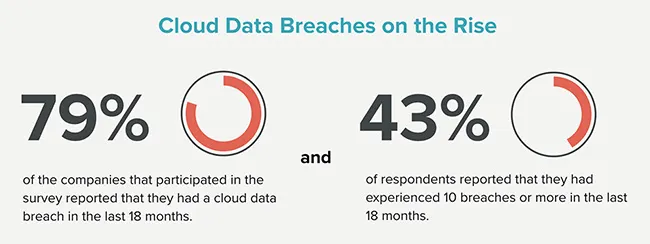
Nothing brings the importance of cloud security to life like learning from real incidents. Here are some eye-opening examples:
- AWS S3 Bucket Breach: In 2017, sensitive data from over 123 million Verizon customers was left exposed due to a simple misconfiguration in an AWS S3 bucket. This incident is a powerful reminder that even minor oversights in access control settings can have massive repercussions.
- Capital One Data Breach: Fast forward to 2019, when a misconfigured firewall allowed unauthorized access to data from more than 100 million Capital One customers. This breach shows why regular security audits and vulnerability assessments are non-negotiable for any cloud environment.
- Dropbox Data Breach: Back in 2012, Dropbox suffered a data breach affecting 68 million users, largely due to weak security around employee accounts. The lesson? Investing in solid employee training and access controls isn’t optional. It’s a foundational layer of cloud security.
Conclusion
In today’s digital landscape, cloud security is more critical than ever. As organizations increasingly rely on cloud technology for innovation and efficiency, the risks of data breaches and unauthorized access grow more severe. By understanding the shared responsibility model, implementing cloud security best practices, and staying compliant with regulations, organizations can significantly bolster their security posture.
To succeed in the cloud, make continuous improvement a priority in your security practices. By regularly reviewing strategies and raising awareness within your teams, you can protect vital assets and thrive in the cloud.