Mastering Amazon Bedrock Inference Profiles
A Practical Guide to Project-Based Cost Tracking and Management on Amazon Bedrock
Amazon Bedrock has changed the way teams deploy and operate generative AI workloads on AWS. You can experiment faster, integrate powerful foundation models easily, and scale without worrying about the underlying infrastructure.
But once AI usage spreads across multiple projects, teams, and environments, a familiar problem appears:
“Who is actually spending how much on Bedrock?”
This is exactly where Amazon Bedrock Inference Profiles become useful. They provide a way to separate usage, track costs per project, and apply operational controls.
In this article, we’ll walk through what inference profiles are, why they matter, and how to use them effectively in real-world AWS environments.
What Are Amazon Bedrock Inference Profiles?
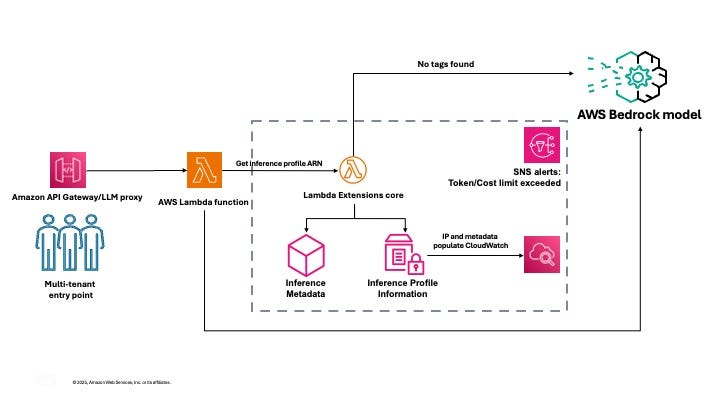
Amazon Bedrock Inference Profiles are custom, logical endpoints that sit in front of foundation models. Instead of calling a model directly, your application calls an inference profile.
You can think of them as dedicated access channels to Bedrock models, each one representing a project, customer, environment, or use case.
With inference profiles, you gain:
- Clear cost attribution
- Isolated monitoring and metrics
- Better governance and access control
- Cleaner multi-project architecture
Types of Inference Profiles
There are two main types:
- System-defined inference profiles
Pre-created by AWS, mainly used for cross-region routing and internal load balancing. - Application inference profiles
Created and managed by you. These are the profiles you’ll use for:
- Project-based cost tracking
- Team or customer isolation
- Environment separation (dev / staging / prod)
This guide focuses primarily on application inference profiles.
Why Use Application Inference Profiles?
1. Granular Cost Tracking
By default, all Bedrock usage is grouped under a single service line item. That makes it difficult to answer simple questions like:
- Which project is driving costs?
- Which environment is the most expensive?
- Can we charge this usage back to a specific team or customer?
Inference profiles solve this by allowing:
- Tag-based cost allocation
- Project-level visibility in AWS Cost Explorer
- Chargeback and showback models
- Clean financial reporting without guesswork
2. Better Operational Control
Each inference profile behaves like an independent endpoint. This means you can:
- Monitor usage patterns per project
- Set budgets and alerts per profile
- Apply IAM permissions at a finer level
- Track latency and token usage independently
This is especially useful when multiple teams share the same AWS account.
3. Scalable Multi-Project Management
For organizations running multiple AI initiatives, inference profiles provide:
- Logical isolation without separate accounts
- Independent scaling
- Cleaner compliance and audit trails
- Easier governance as AI adoption grows
Setting Up Application Inference Profiles
Prerequisites
Before getting started, make sure you have:
- AWS CLI or SDK configured
- Access to Amazon Bedrock in the target region
- Model access enabled in Bedrock
- IAM permissions for Bedrock and tagging operations
Creating Your First Inference Profile
The exact setup differs slightly by region because model availability and routing rules vary.
Example: US East (us-east-1)
In us-east-1, you can create a profile directly from a foundation model ARN.
import boto3
bedrock = boto3.client("bedrock", region_name="us-east-1")
response = bedrock.create_inference_profile(
    inferenceProfileName="ProjectA-USEast",
    description="ProjectA cost tracking profile (US East)",
    modelSource={
        "copyFrom": "arn:aws:bedrock:us-east-1::foundation-model/anthropic.claude-3-sonnet-20240229-v1:0"
    },
    tags=[
        {"key": "Project", "value": "ProjectA"},
        {"key": "Environment", "value": "production"},
        {"key": "CostCenter", "value": "AI-Team"},
        {"key": "Department", "value": "Engineering"}
    ]
)
profile_arn = response["inferenceProfileArn"]
print(f"Profile ARN: {profile_arn}")
Example: EU Central (eu-central-1)
In eu-central-1, profiles must be created from system-defined inference profiles, not directly from foundation models.
import boto3
bedrock = boto3.client("bedrock", region_name="eu-central-1")
response = bedrock.create_inference_profile(
    inferenceProfileName="ProjectA-EUCentral",
    description="ProjectA cost tracking profile (EU Central)",
    modelSource={
        "copyFrom": "arn:aws:bedrock:eu-central-1:<...>:inference-profile/eu.anthropic.claude-sonnet-4-20250514-v1:0"
    },
    tags=[
        {"key": "Project", "value": "ProjectA"},
        {"key": "Environment", "value": "production"},
        {"key": "Region", "value": "eu-central-1"},
        {"key": "Model", "value": "claude-sonnet-4"}
    ]
)
Regional Differences (Important)
- us-east-1 → You can copy directly from foundation model ARNs
- eu-central-1 → You must use system-defined inference profile ARNs
This is expected behavior and depends on how AWS deploys Bedrock models region by region.
Implementing Cost Tracking
Tagging Strategy (This Really Matters)
Your cost visibility is only as good as your tagging discipline.
A recommended baseline:
recommended_tags = [
    {"key": "Project", "value": "ProjectA"},
    {"key": "Environment", "value": "production"},
    {"key": "CostCenter", "value": "AI-Team"},
    {"key": "Department", "value": "Engineering"},
    {"key": "Owner", "value": "TeamAlpha"},
    {"key": "Region", "value": "eu-central-1"},
    {"key": "Model", "value": "claude-sonnet-4"}
]
If you do only one thing after reading this article: standardize your tags early.
Using an Inference Profile in Your Application
Once created, inference profiles can be used exactly like a model ID.
import boto3
import json
def invoke_with_profile(profile_arn, message, region="eu-central-1"):
    bedrock_runtime = boto3.client("bedrock-runtime", region_name=region)
    body = {
        "messages": [{"role": "user", "content": message}],
        "max_tokens": 100,
        "anthropic_version": "bedrock-2023-05-31"
    }
    response = bedrock_runtime.invoke_model(
        modelId=profile_arn,
        body=json.dumps(body)
    )
    result = json.loads(response["body"].read())
    return result

# Example usage
profile_arn = "arn:aws:bedrock:eu-central-1:<...>:application-inference-profile/abc123"
result = invoke_with_profile(profile_arn, "Hello from ProjectA!")
No application refactor required. Just swap the model ID.
Monitoring Costs with AWS Cost Explorer
After usage starts, costs will appear in Cost Explorer (usually within 24–48 hours).
import boto3
from datetime import datetime, timedelta
def get_project_costs(projects, days=30):
    ce = boto3.client("ce", region_name="us-east-1")
    end_date = datetime.now().strftime("%Y-%m-%d")
    start_date = (datetime.now() - timedelta(days=days)).strftime("%Y-%m-%d")
    response = ce.get_cost_and_usage(
        TimePeriod={"Start": start_date, "End": end_date},
        Granularity="MONTHLY",
        Metrics=["BlendedCost"],
        GroupBy=[{"Type": "TAG", "Key": "Project"}],
        Filter={
            "And": [
                {"Dimensions": {"Key": "SERVICE", "Values": ["Amazon Bedrock"]}},
                {"Tags": {"Key": "Project", "Values": projects}}
            ]
        }
    )
    project_costs = {}
    for result in response["ResultsByTime"]:
        for group in result["Groups"]:
            project = group["Keys"][0] if group["Keys"] else "Untagged"
            cost = float(group["Metrics"]["BlendedCost"]["Amount"])
            project_costs[project] = cost
    return project_costs
Real-World Use Cases
- Multi-Tenant SaaS
Create one inference profile per customer and track usage cleanly.
2. Department-Based Cost Allocation
Marketing, Engineering, Support, and Research can all share Bedrock while keeping costs separate.
3. Environment Separation
Different profiles for:
- Development (smaller, cheaper models)
- Staging
- Production (full-capability models)
Advanced Cost Management
Budget Alerts
import boto3
def setup_project_budget(project_name, monthly_limit=100):
    budgets = boto3.client("budgets", region_name="us-east-1")
    account_id = boto3.client("sts").get_caller_identity()["Account"]
    budgets.create_budget(
        AccountId=account_id,
        Budget={
            "BudgetName": f"{project_name}-Bedrock-Monthly-Budget",
            "BudgetLimit": {"Amount": str(monthly_limit), "Unit": "USD"},
            "TimeUnit": "MONTHLY",
            "BudgetType": "COST",
            "CostFilters": {
                "Service": ["Amazon Bedrock"],
                "TagKey": ["Project"],
                "TagValue": [project_name]
            }
        }
    )
CloudWatch Metrics
Inference profiles automatically emit metrics such as:
- InvocationCount
- InputTokenCount
- OutputTokenCount
- Latency
These are perfect for dashboards and alarms.
Best Practices
- Use consistent naming conventions
- Never skip tagging
- Review costs weekly
- Clean up unused profiles regularly
- Treat inference profiles as long-lived infrastructure
Conclusion
AWS Bedrock Inference Profiles are one of those features that seem optional at first, until your AI usage grows. Then they become essential.
With proper use, they allow you to:
- Understand exactly where AI spend is going
- Enforce accountability across teams
- Scale AI workloads without losing control
- Make better decisions based on real cost data
Start with a single project, get the tagging right, and build from there. Your future self (and finance team) will thank you.
For more information please check: https://aws.amazon.com/tr/blogs/machine-learning/manage-multi-tenant-amazon-bedrock-costs-using-application-inference-profiles/