What Is CloudFront Static Anycast IP and Why Is It Used?
Amazon CloudFront does not provide static IP addresses by default. Instead, it operates behind a dynamic IP pool and is typically accessed via a CNAME record at the DNS level.
However, in certain scenarios:
- You need a fixed (static) IP address
- You cannot use a CNAME record on the DNS side
This is where CloudFront Static Anycast IP becomes relevant.
A Static Anycast IP is a set of AWS-managed, fixed IPv4 addresses that are anycasted across CloudFront edge locations globally and mapped directly to a specific CloudFront distribution.
Why Do We Use Static Anycast IP?
1. Allow Listing / Firewall Scenarios
In many enterprise or restricted environments, CloudFront traffic must originate from known and fixed IP addresses, such as:
- Firewalls
- WAF rules
- Partner systems
- Corporate networks
Since standard CloudFront IP ranges change frequently, allowlisting them is impractical. Static Anycast IP solves this problem by providing stable IP addresses for CloudFront traffic.
2. Third-Party Integrations
Some third-party services:
- Do not accept DNS hostnames
- Require IP-based configuration only
In such cases, CloudFront must appear as a single IP endpoint. Static Anycast IP enables CloudFront to integrate cleanly with IP-only systems.
3. Apex Domain (Root Domain) Limitation
Many domain providers do not support CNAME records for apex (root) domains, such as:
example.com
This means you cannot configure:
example.com -> CNAME d123456abcdef.cloudfront.net
However, you may still want to serve your apex domain through CloudFront. This requires a static IP address, which is exactly what Static Anycast IP provides.
Our Use Case
In our case:
- We want example.com to be served via a CloudFront distribution
- The domain provider does not allow CNAME records at the apex level
The solution is to use CloudFront Static Anycast IP combined with an A record.
How Does It Work?
AWS assigns you a set of static anycast IPv4 addresses.
On the DNS side, you configure an A record like this:
example.com -> A 3.4.5.6
This IP address:
- Is fully managed by AWS
- Is anycasted across CloudFront edge locations
- Is mapped internally to your CloudFront distribution
So when a user:
- Connects to the IP address
- AWS identifies which CloudFront distribution it belongs to
- The request is routed to the correct distribution
All traffic is transparently served through CloudFront.
How to Obtain Static Anycast IPs
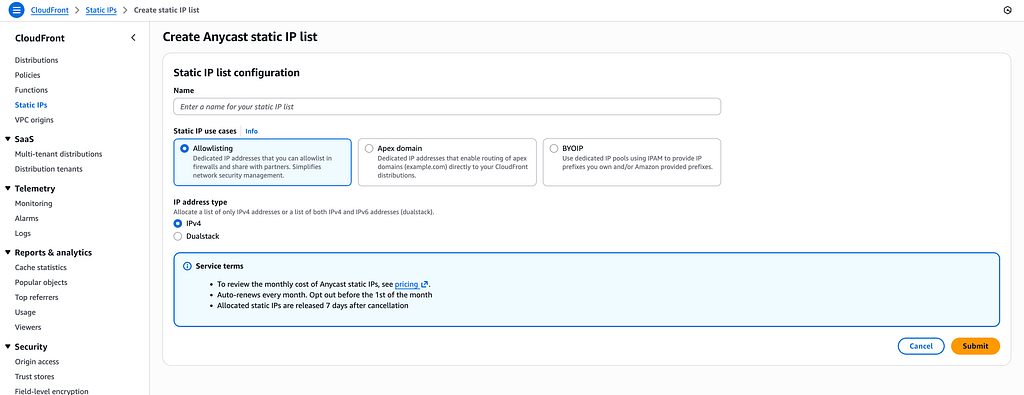
Static Anycast IPs are not enabled by default.
You must open an AWS Support case and request a quota increase. In the support request, you need to provide:
- Number of IPs required (between 3 and 24)
- Expected traffic volume
- Requests per second
- Upload bandwidth
- Business justification
In our case, we needed apex domain routing, we requested 3 IP addresses. Once approved, AWS assigns the IPs to your account.
CloudFront Distribution Requirements
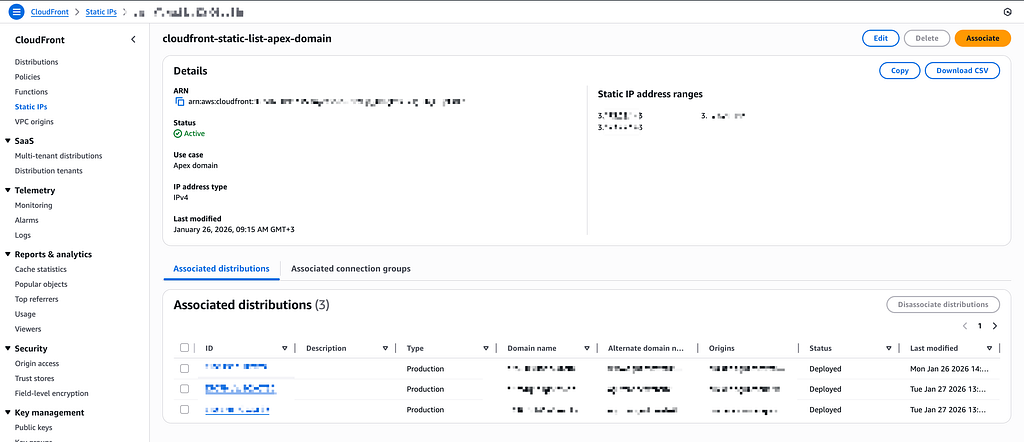
Static Anycast IPs cannot be associated with every CloudFront distribution. AWS enforces the following requirements:
1. IPv4 Only
- The distribution must be IPv4-only
- IPv6 must be disabled
If IPv6 is enabled, association is not allowed.
2. All Edge Locations Must Be Enabled
- No price class restrictions
- All edge locations must be enabled
Limited price classes are not supported.
Associating Static Anycast IPs with a Distribution
Once the requirements are met, you can associate the Static Anycast IPs with your CloudFront distribution. AWS then establishes the following mapping internally:
Static Anycast IP → CloudFront Distribution
DNS Configuration
After receiving the Static Anycast IPs, you are not required to assign all IPs to a single apex domain. In fact, distributing them across different domains is often a cleaner approach.
For example, with three Static Anycast IPs:
3.4.5.6
3.4.5.7
3.4.5.8
A recommended setup would be:
example.com  -> A 3.4.5.6
example1.com  -> A 3.4.5.7
example2.com   -> A 3.4.5.8
Since Static Anycast IPs can be associated with multiple CloudFront distributions, this configuration is fully supported.
Final Result
After configuration:
- A user accesses example.com
- Traffic reaches the Static Anycast IP
- AWS routes the request directly to CloudFront
- The site is served reliably through CloudFront
Summary
- CloudFront does not provide static IPs by default
- Static Anycast IP solves this limitation
- Useful for firewall allowlisting, third-party integrations, and apex domain routing
- Enables CloudFront usage even when CNAME records are not supported at the root domain level
This approach allowed us to successfully serve our apex domain through CloudFront, despite DNS provider limitations.
For more information on how Anycast Static IPs works, you can check this blog: https://aws.amazon.com/blogs/networking-and-content-delivery/zero-rating-and-ip-address-management-made-easy-cloudfronts-new-anycast-static-ips-explained/