Zero Trust: The Key to Cloud Security
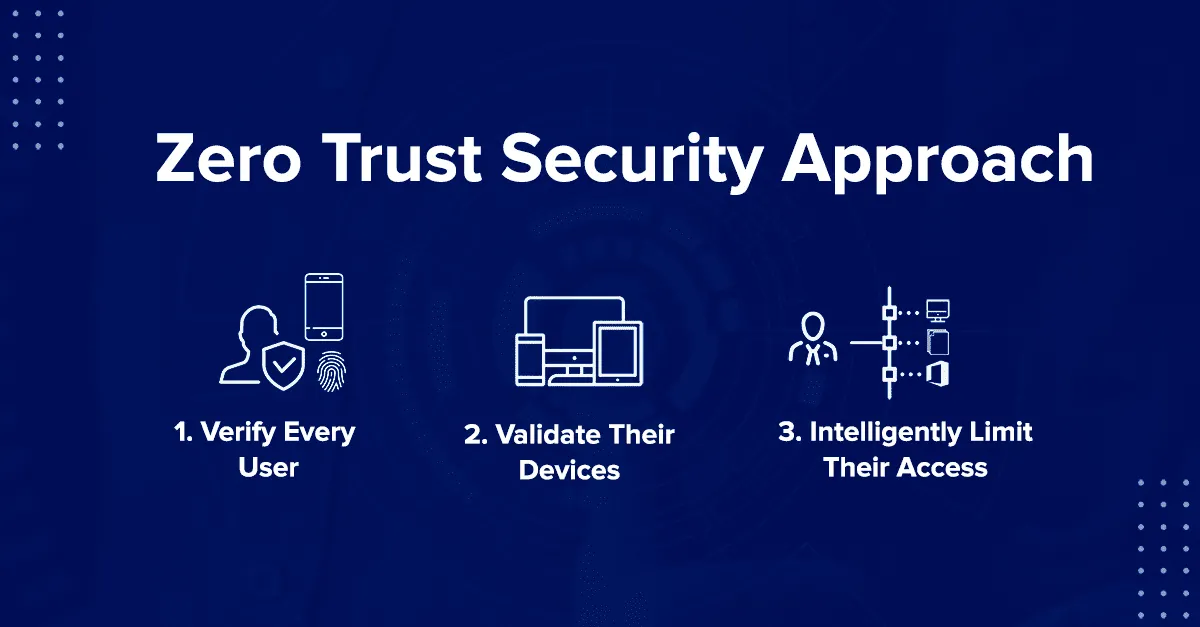
You’re sipping your coffee when the news breaks: another Fortune 500 company lost millions of customer records due to stolen credentials. Trusted insiders, poorly segmented networks, and a lack of verification — it’s a story we hear all too often.
The “castle-and-moat” approach to security once worked when everything stayed inside corporate walls. Like a medieval castle surrounded by a moat, this model focused on building strong perimeter defenses and trusting everything inside. But today, applications live in the cloud, employees work remotely, and data flows across hybrid environments. The moat has disappeared, and relying on implicit trust? That’s like leaving your front door unlocked because you trust the neighborhood.
Zero Trust flips the script by removing trust from the equation altogether. It doesn’t care if a user is inside or outside your network — every device, user, and application must prove itself, every time. Unlike traditional models that react to threats after they occur, Zero Trust assumes breaches are inevitable and limits their impact from the start.
In this article, we’ll dive deep into what Zero Trust really means, why it’s a game-changer for cloud environments, and how you can implement it — step by step — with AWS at the core.
What Is Zero Trust? A Deep Dive into the Concept
Zero Trust means trusting no one and nothing by default. It’s a security framework built on a simple but powerful idea — never trust, always verify.
In traditional models, once someone made it past the perimeter (think firewalls, VPNs, or passwords), they were trusted. But Zero Trust flips the game. It doesn’t care if a user is working from your office, at home, or on a beach in Bali — every action must prove its legitimacy.
The Core Principles of Zero Trust
- Verify Explicitly:
Every user, device, and application must be continuously authenticated and authorized. Think multi-factor authentication (MFA), device posture checks, and conditional access policies. - Least Privilege Access:
Only give people or applications the bare minimum access they need. Why let someone read an entire database if all they need is one row? - Assume Breach:
Instead of hoping breaches don’t happen, Zero Trust assumes they will. This mindset ensures your network is segmented and monitored to limit damage when an attack occurs.
Analogy: The Modern Office vs. a Castle
Traditional security is like a castle: strong walls, a deep moat, and a single entrance. Once inside, everyone’s trusted to roam freely.
Zero Trust is like a modern office:
- You scan a badge at every door.
- Only authorized people can enter specific rooms.
- Surveillance cameras and alarms keep watch 24/7.
It’s the difference between blanket trust and smart, granular control.
Zero Trust isn’t about paranoia — it’s about smart skepticism. It acknowledges the world has changed and ensures your security evolves with it.
The Pillars of Zero Trust Architecture
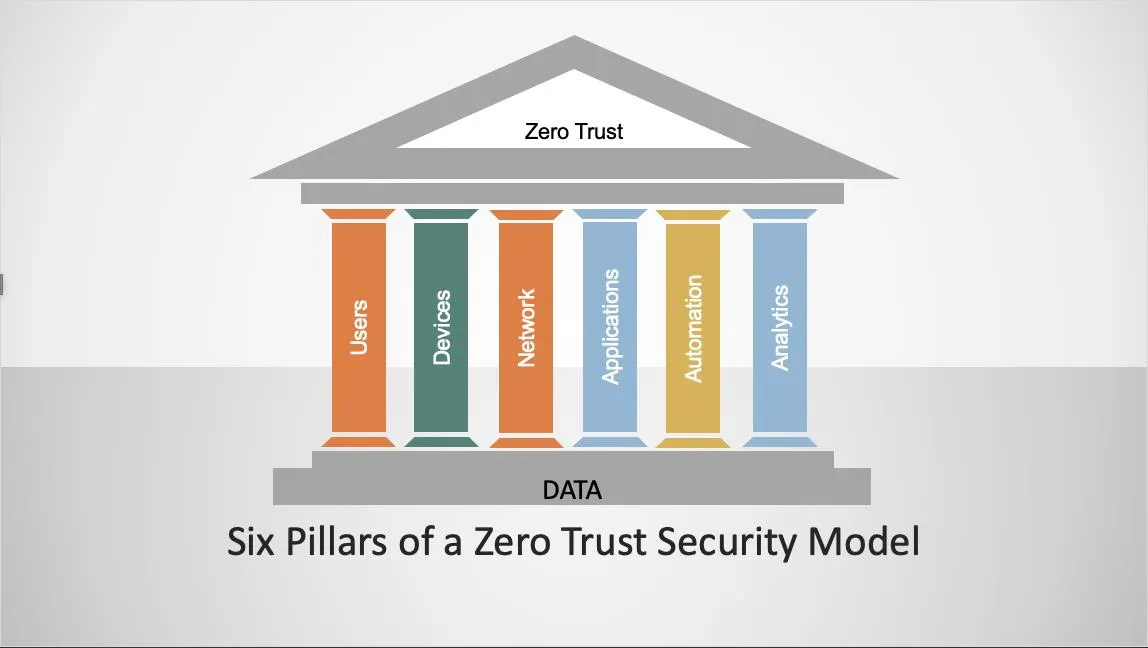
Zero Trust isn’t just a set-it-and-forget-it concept — it’s an architecture built on six key pillars. Each one plays a critical role in strengthening your security posture, from verifying users at every step to continuously monitoring for anomalies. Let’s break them down.
1. Identity: The Foundation of Secure Access
You wouldn’t let someone into a building without verifying their ID first. In Zero Trust, identity is everything. Users, devices, and applications must authenticate themselves every time they request access to resources.
Authentication and Authorization are your first lines of defense. IAM (Identity and Access Management) systems like AWS IAM, Azure AD, or Google Identity are the backbone of this pillar. They allow you to create strong, granular policies that ensure only the right people (and machines) get the right access.
But authentication alone isn’t enough. Add multi-factor authentication (MFA) to the mix to raise the bar and make it exponentially harder for attackers to slip through.
2. Devices: Trust No Device by Default
A user might be well-verified, but what about their device? If someone is using an old, unpatched laptop or an infected mobile phone, they could be opening the door to a breach. Zero Trust takes device security seriously by ensuring that only trusted devices are allowed to connect to your network.
This can be achieved through device posture checks — checking whether a device has the latest security updates, a valid antivirus, or a compliant security configuration. Tools like AWS Systems Manager and AWS Device Farm can help you enforce device security policies.
3. Networks: Micro-Segmentation to Prevent Lateral Movement
In the traditional model, once an attacker gets past the firewall, they can move freely within the network. But in Zero Trust, we don’t assume that any part of the network is safe. Instead, we micro-segment the network to prevent lateral movement — meaning an attacker who gets access to one part of your environment can’t just stroll around and access other critical systems.
Micro-segmentation means isolating workloads, creating perimeters around sensitive applications, and using tools like AWS VPC, Azure Virtual Networks, or Google Cloud VPCs to limit access to specific services. This way, even if someone compromises one section, they’re stuck there, unable to move freely.
4. Applications: Enforcing Least-Privilege Access
Zero Trust demands granular access control for all your applications. You don’t want to give users or services access to more than they need. This is where the least-privilege principle comes in.
Instead of giving someone access to an entire database, give them just the specific data they need. Use role-based access control (RBAC) to limit access to APIs, applications, and databases. AWS tools like IAM policies, AWS Resource Access Manager (RAM), and AWS Lambda permissions can help ensure that only the necessary permissions are granted.
5. Data: Protecting What Matters Most
Data is the crown jewel of any organization. Zero Trust recognizes that protecting data isn’t just about keeping bad actors out; it’s about ensuring only the right people have access to the right data.
Encryption is a non-negotiable part of this pillar — encrypting data both at rest and in transit ensures that sensitive data is protected no matter where it goes. AWS KMS (Key Management Service), Amazon RDS encryption, and Amazon S3 encryption are solid tools for managing and securing your data.
Also, data access policies should be as strict as possible. Don’t let any device, user, or application access sensitive information without being explicitly authorized.
6. Visibility and Analytics: Monitoring for Continuous Improvement
Here’s where things really get exciting. In Zero Trust, visibility is everything. Monitoring is your early-warning system. With modern tools like Prometheus, Grafana, and cloud-native services like AWS CloudTrail or Amazon GuardDuty, you can ensure you’re always in the loop.
Prometheus is an open-source monitoring system that collects time-series data, which can be used to track everything from application performance to unusual user behavior. Pair this with Grafana, an open-source data visualization tool, and you have a powerful combo for real-time analytics and security monitoring. Using these tools, you can continuously analyze metrics, identify potential security threats, and take action before any damage is done.
In addition, cloud-native tools like AWS CloudWatch can be integrated with Prometheus to provide deeper insights into both performance and security.
Putting It All Together: A Holistic Approach
Each of these pillars feeds into one another to create a multi-layered defense system that’s resilient and adaptive to modern threats. When done right, Zero Trust isn’t just about preventing breaches; it’s about limiting the blast radius and ensuring that even if an attack occurs, it doesn’t spread.
Why Zero Trust Is Essential for the Cloud
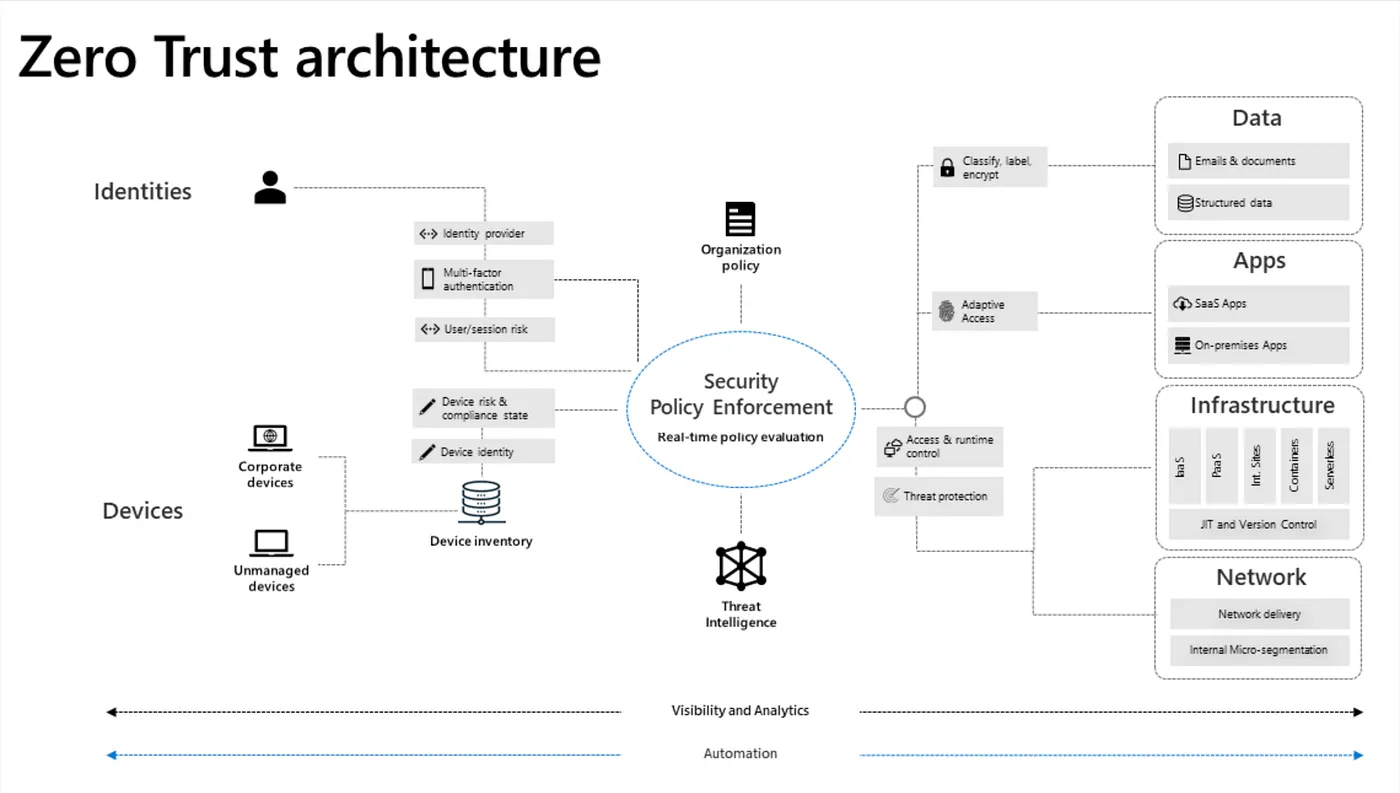
Cloud security comes with its own set of challenges. Resources scale up and down in real-time, teams work from everywhere, and data is spread across regions. With all this, traditional security models just can’t keep up. Zero Trust is built for this new era, where security isn’t based on trust but on constant verification — and that’s exactly what the cloud needs.
Let’s break down how Zero Trust fits perfectly into the cloud.
- Dynamic Environments: Containers and Autoscaling
Cloud services like AWS or Azure often use containers that scale automatically based on demand. One minute a container is up, the next it’s gone, and a new one replaces it. This makes it hard to apply traditional security models, which rely on static infrastructure.
With Zero Trust, every container, even if it’s ephemeral, must prove its identity each time it connects. IAM roles in AWS are assigned to containers, giving them only the permissions they need at any given moment. You can use AWS ECS (Elastic Container Service) or AWS Fargate to manage these permissions dynamically, ensuring that each container has the right access based on its role and the specific task it’s performing. - Increased Attack Surfaces: Global Access and Remote Teams
In the cloud, people and systems can access resources from anywhere — whether they’re in the office, working from home, or even traveling internationally. This means the potential for attackers to get in is much higher.
Zero Trust ensures secure access no matter where it’s coming from. With AWS IAM and MFA (Multi-Factor Authentication), you can require users to authenticate themselves with multiple layers of verification, even if they’re logging in from a new location or device. This way, if a user’s credentials get compromised, the attacker still needs to pass multiple checks before gaining access. - Shared Responsibility & Misconfigurations
In the cloud, security is a shared responsibility between the provider and the customer. Providers secure the physical infrastructure, but it’s on you to secure your data, access, and applications. Misconfigurations in this model are a major cause of breaches.
Zero Trust minimizes this risk by using micro-segmentation. This means dividing your network into smaller, isolated sections so that even if one part is compromised, the attacker can’t move laterally through your entire system. In AWS, you can use VPC (Virtual Private Cloud) and Security Groups to control traffic between instances, ensuring that only the right resources can communicate with each other. - Continuous Monitoring: Detecting Threats in Real Time
Cloud environments are always changing, and so are the threats. The traditional “set it and forget it” model doesn’t work anymore. You need real-time monitoring to detect and respond to threats as they happen.
Zero Trust is all about continuous monitoring. With tools like AWS CloudTrail and GuardDuty, you can track every action in your environment. CloudTrail logs every API call, while GuardDuty automatically detects unusual activity and potential threats. With these tools, you can set up automated responses to suspicious actions, reducing the time it takes to mitigate a breach.
In short, Zero Trust is essential for the cloud because it adapts to the dynamic, distributed nature of cloud environments. With tools like IAM, micro-segmentation, and continuous monitoring through AWS CloudTrail and GuardDuty, you can secure your cloud infrastructure — no matter how fast it grows or how complex it becomes.
Conclusion: Zero Trust Is a Journey, Not a Destination
The world has changed, and so have the risks. Zero Trust is all about adapting to this new reality; removing assumptions, questioning everything, and building security that works no matter where your data or users are.
By verifying every user and device, limiting access to what’s truly necessary, and keeping a constant eye on your systems, Zero Trust turns security into a proactive, resilient framework. In today’s fast-paced digital environment, that’s not just important — it’s essential.
CREDITS
- https://www.crowdstrike.com/cybersecurity-101/zero-trust-security/
- https://www.cloudflare.com/learning/security/glossary/what-is-zero-trust/
- https://learn.microsoft.com/en-us/security/zero-trust/zero-trust-overview
- https://www.ibm.com/think/topics/zero-trust
- https://cloud.google.com/learn/what-is-zero-trust
- https://nvlpubs.nist.gov/nistpubs/specialpublications/NIST.SP.800-207.pdf